
CompareDesk icon
CompareDesk icon

CompareDesk

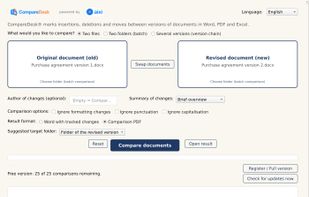
CompareDesk compares two or more versions of a document and reports every insertion, deletion and move. It handles DOCX, DOC, RTF, TXT, PDF and XLSX in any combination, including a PDF against a Word file and a scanned document against a draft.
CompareDesk screenshot 1

Cost / License

  • Freemium (Subscription)
  • Proprietary

Application type

Platforms

  • Mac
  • Windows
0likes
0articles
Save

Features

  1.  Ad-free
  2.  No registration required
  3.  Works Offline
  4.  Diff detection
  5.  File Comparison

CompareDesk News & Activities

Highlights All activities

Recent activities

CompareDesk information

  • Developed by

    AT flagAIXI Digital GmbH
  • Licensing

    Proprietary and Freemium product.
  • Pricing

    Subscription + free version with limited functionality.
  • Alternatives

    8 alternatives listed
  • Badge

    Get an embeddable badge for CompareDesk
  • Supported Languages

    • English
    • German
    • French
    • Italian
    • Spanish
    • Portuguese
    • Dutch
    • Polish
    • Turkish
    • Croatian

AlternativeTo Categories

Development, File Management
CompareDesk was added to AlternativeTo by AIXI_Digital on and this page was last updated .

No comments or reviews, maybe you want to be first?

Official Links

What is CompareDesk?

CompareDesk compares two or more versions of a document and reports every insertion, deletion and move. It handles DOCX, DOC, RTF, TXT, PDF and XLSX in any combination, including a PDF against a Word file and a scanned document against a draft.

The result is delivered as a Word file (or Excel file) with tracked changes ready for further editing, as a comparison PDF with a change bar on every altered line, or as a workbook when spreadsheets are compared. Tables and footnotes are compared as well, and built-in text recognition handles scans without a text layer.

Folders can be compared pair by pair to speed up your work, and several versions of one document can be arranged into a version history to show exactly the history of changes.

All processing runs on the user's own computer. No file is uploaded, no cloud service is involved and no account is required. This makes the program suitable for law firms, notaries and in-house legal teams that work under professional confidentiality obligations.

Every output carries the SHA-256 checksums of both source files and a signed comparison certificate that can be verified without a network connection. CompareDesk is a self-contained application for Windows and macOS; neither Word nor Excel needs to be installed. The free version includes twenty-five full comparisons without registration and without a time limit.
