





Verso · Versioned Writing
Like
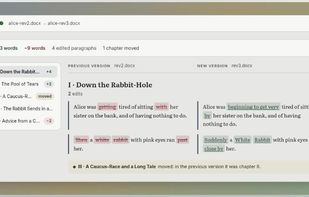
Verso shows what changed between two versions of a text. Drop in the previous and the new version and read the differences side by side: words added in green, removed in red, and chapters or paragraphs that changed position marked as moved instead of deleted and rewritten.

Cost / License
- Pay once
- Proprietary
Application type
Platforms
- Online


Features
Highlights All activities
Verso · Versioned Writing News & Activities
Recent activities
- Ramon-Alex-Ferreira added Verso · Versioned Writing
 Ramon-Alex-Ferreira added Verso · Versioned Writing as alternative to Draftable, Diff Guru, Diffchecker, WinMerge and 4 more

Developed by
Ramon Alex FerreiraLicensing
Proprietary and Commercial product.Pricing
One time purchase (perpetual license) that costs $12.Alternatives
8 alternatives listedBadge
Get an embeddable badge for Verso · Versioned WritingSupported Languages


No comments or reviews, maybe you want to be first?