

CodeShellManager
1 like
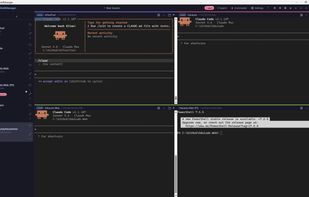
A Windows desktop app for running multiple AI coding agents side-by-side — Claude Code, Codex, GitHub Copilot, or any CLI tool — in a tabbed and grid-layout terminal host.
Cost / License
- Free
- Open Source (MIT)
Platforms
- Windows
- Chocolatey
Features
- Full-Text Search
Git integration
- AI-Powered
- Support for Keyboard Shortcuts
- Side-by-Side View
- Terminal-based
GitHub Copilot Integration
CodeShellManager News & Activities
Highlights All activities
Recent activities
- niksavc liked CodeShellManager
- POX added AI Coding Assistant as a feature to CodeShellManager
- POX added CodeShellManager as alternative to SuperHQ, Optio, cook and Aizen
- POX updated CodeShellManager
- POX added CodeShellManager
CodeShellManager information
No comments or reviews, maybe you want to be first?
What is CodeShellManager?
A Windows desktop app for running multiple AI coding agents side-by-side — Claude Code, Codex, GitHub Copilot, or any CLI tool — in a tabbed and grid-layout terminal host.
Built with WPF + xterm.js + Windows ConPTY for full pseudo-terminal fidelity.
Features:
- Multi-terminal grid — run up to 18 sessions simultaneously in configurable layouts (1, 2, 3, 4, 6 columns; 2×2, 6×2, 6×3 grids); the active pane is highlighted with a 2px accent ring so it's easy to spot
- Sidebar groups — organise sessions into named groups with their own color and filter strip; bulk actions (sleep / close / re-group) operate on the active group
- Sleep & wake — 💤 button parks a session: PTY torn down, but the session (and its notes) stays in the sidebar so you can wake it later from where you left off. Great when you have many long-running projects but only need a few live at once.
- Recently closed — Ctrl+Shift+T reopens the last-closed session (browser convention); the New Session dialog also lists the last 10 closed sessions for one-click revival
- Per-session run commands — define a list of labelled commands per session (Test, Build, Watch…); ? runs the default, F5 / Shift+F5 run/stop it, output streams into a side drawer without touching the parent terminal. Optional post-run URL opens in your browser on exit code 0.
- Full-text search — all terminal output indexed to SQLite FTS5; instant search across every session, ever
- Per-project notepad — collapsible 📝 notes panel on every terminal, auto-saved and searchable
- Alert detection — detects when Claude is waiting for input or tool approval; green/orange dot indicators
- Git status — shows branch and dirty state in the sidebar per session
- Session rename — double-click any session name or click ? to rename inline
- Auto-resume — automatically resumes the last Claude Code session when restoring on startup (--resume <id>); toggleable in Settings
- SSH remote sessions — connect to remote hosts using your existing SSH config; sessions persist across restarts
- Windows Terminal profile import — opt-in import of profiles from Windows Terminal's settings.json; pick a profile in the New Session dialog to stamp its font, color scheme, cursor and padding onto the new terminal
- Launch & shutdown spinners — every starting session shows a brief overlay (Starting <cmd>… or Connecting to <host>…) until the first PTY byte arrives; closing the window shows a "Shutting down…" overlay during session disposal
- Session history — clicking a search result from a closed session offers to relaunch it
- Configurable launch commands — customise the commands available in the New Session dialog
- Claude badge — sessions running claude commands get a visual indicator
- Tray icon — minimises to system tray; balloon notifications for alerts
- Settings window — all options configurable; persisted as JSON



