

CloneScan
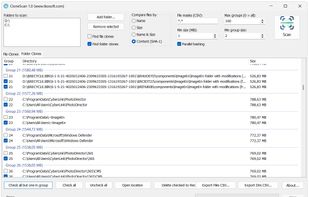
CloneScan is a freeware duplicate file and folder scanner for Windows. It can find repeated files by name, size, name and size, or SHA-1 content hash, detect duplicate folders, export results to CSV, and move selected copies to the Recycle Bin.
Cost / License
- Free
- Proprietary

Platforms
- Windows

CloneScan
Features
Properties
- Lightweight
Features
- No registration required
- No Tracking
- Works Offline
- Ad-free
- Duplicate File Finder
Tags
CloneScan News & Activities
Recent activities
CloneScan information
What is CloneScan?
CloneScan is a freeware Windows application that helps users locate duplicate files and repeated folder structures. It is designed for people who need to clean up downloads, backups, archives, photo collections, project folders, or other directories where extra copies may collect over time.
The program can scan selected folders and compare files using different methods: file name, file size, name plus size, or SHA-1 content hash. The content-based mode is especially useful for finding identical files even when the filenames are different.
CloneScan presents duplicate results in groups, so users can review copies before removing anything. It also includes file masks, a minimum file size filter, duplicate folder detection, CSV export, parallel hashing, an “open location” option, and safe deletion to the Windows Recycle Bin.

