
ClipCite icon
ClipCite icon

ClipCite

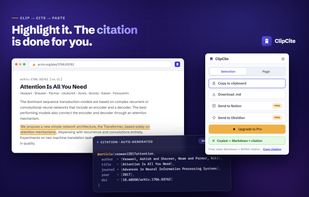
ClipCite is a Chrome extension for students, researchers and writers who need the source, not just the text. Highlight a passage on any web page, click once, and you get the quote as clean Markdown plus a formatted citation built from the page's own metadata (Highwire...
ClipCite screenshot 1

Cost / License

  • Freemium (Subscription)
  • Proprietary

Platforms

  • Online  The online version is a free citation generator.
  • Google Chrome
0likes
0comments
0articles

Features

Properties

  1.  Lightweight
  2.  Privacy focused

Features

  1.  No registration required
  2.  Support for MarkDown
  3.  No Tracking
  4.  Ad-free
  5.  Web Clipper
  6. Instapaper icon  Instapaper integration
  7. Obsidian icon  Obsidian Integration
  8. Notion icon  Notion Integration

ClipCite News & Activities

Highlights All activities

Recent activities

ClipCite information

  • Developed by

    IT flagAntonio Todisco
  • Licensing

    Proprietary and Freemium product.
  • Pricing

    Subscription that costs $6 per month + free version with limited functionality.
  • Alternatives

    7 alternatives listed
  • Supported Languages

    • English
    • Italian
    • Spanish
    • Chinese
ClipCite was added to AlternativeTo by todi03 on and this page was last updated .
No comments or reviews, maybe you want to be first?

What is ClipCite?

ClipCite is a Chrome extension for students, researchers and writers who need the source, not just the text. Highlight a passage on any web page, click once, and you get the quote as clean Markdown plus a formatted citation built from the page's own metadata (Highwire, Dublin Core, Open Graph). When the page carries a DOI, the citation is fetched from Crossref — the publisher's record, not a scrape.

Free tier: article extraction via Mozilla Readability (the engine behind Firefox Reader View), selection-mode clipping, BibTeX output, copy-citation-only, and export to clipboard or a .md file. Pro (from €6/month, €48/year, €99.99 lifetime) adds APA style alongside BibTeX, Send to Notion, and Send to Obsidian.

Local-first: clips, history and tokens stay in chrome.storage.local. No account, no analytics, no server. Permissions are limited to activeTab and storage, so a page is read only at the moment you click. UI in English, Italiano, Español and Simplified Chinese.

It is deliberately narrow. ClipCite is not a reference manager — no library, no PDF annotation, no word-processor plugin. If you need those, Zotero is the better tool; ClipCite covers the capture step Zotero makes heavy.

Official Links