

Clikr icon
Clikr icon

Clikr

 Like

Clikr turns your phone into a wireless laser pointer and clicker for presentations that run in a desktop web browser.
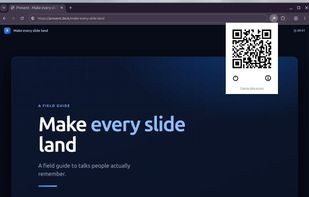
Pairing: the browser extension shows a QR code to scan with your phone.

Cost / License

  • Freemium (Pay once)
  • Proprietary

Since

  • Since 2026

Platforms

  • Online
  • Google Chrome
  • Mozilla Firefox
0likes
0articles
Save

Features

Highlights All activities

Clikr News & Activities

Recent activities

Clikr information

  • Developed by

    SE flagMawal AB
  • First released

    2026
  • Licensing

    Proprietary and Freemium product.
  • Pricing

    One time purchase (perpetual license) that costs $15 + free version with limited functionality.
  • Alternatives

    4 alternatives listed
  • Badge

    Get an embeddable badge for Clikr
  • Supported Languages

    • English
Clikr was added to AlternativeTo by mattiasw on and this page was last updated .

No comments or reviews, maybe you want to be first?

What is Clikr?

Clikr turns your phone into a wireless laser pointer and clicker for presentations that run in a desktop web browser.

It has two parts: a browser extension for Chrome or Firefox on the computer where the slides run, and a web app on your phone that you open by scanning a QR code. There is nothing to install from an app store, and the free features need no account.

Free:

  • Laser pointer: hold the button and point your phone to move a dot on the slide.
  • Swipe to change slides.
  • Scroll and reload the page.
  • Play, pause and skip a video on the page.
  • Slide number and a progress bar on your phone (not on every tool).

Pro is a one-time payment with no subscription, and you can try it for 14 days with no card. It adds:

  • Draw Mode: pen, eraser and clear-all.
  • Spotlight Mode and Magnifier.
  • Speaker Notes and Slide Preview on your phone (Google Slides, PowerPoint for the web and Reveal.js decks only).
  • Presentation Timer.
  • Page Click, Custom Pointer Colors and Pointer Trail.
  • Connect Without Scanning, to reconnect to a computer you have paired with before.

Clikr works with Google Slides, PowerPoint for the web, Canva in present mode, Keynote for the web, Reveal.js and Mentimeter. It only controls decks in a browser tab, not native desktop apps such as PowerPoint desktop or Keynote on macOS.

Your phone and computer connect over an encrypted peer-to-peer connection, and your slides and speaker notes never reach Clikr's servers.