

Clam Sync icon
Clam Sync icon

Clam Sync

 Like

Sync a whole multicam shoot by sound and timecode, then open it as a timeline in Premiere Pro, DaVinci Resolve, Final Cut Pro or Avid.
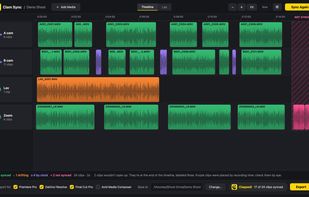
A synced shoot: one track per camera and recorder

Cost / License

  • Freemium (Pay once)
  • Proprietary

Application type

Since

  • New

Platforms

  • Windows
  • Mac  macOS 12.3 or later, Apple silicon and Intel
0likes
0articles
Save

Features

Properties

Features

Highlights All activities

Clam Sync News & Activities

Recent activities

Clam Sync information

  • Developed by

    GB flagsoundlikejaro
  • Licensing

    Proprietary and Freemium product.
  • Pricing

    One time purchase (perpetual license) ranging between $29 and $149 + free version with limited functionality.
  • Alternatives

    8 alternatives listed
  • Badge

    Get an embeddable badge for Clam Sync
  • Supported Languages

    • English
    • German
    • Spanish
    • French
    • Portuguese
    • Russian

AlternativeTo Category

Photos & Graphics
Clam Sync was added to AlternativeTo by Adam-Jaro on and this page was last updated .

No comments or reviews, maybe you want to be first?

Official Links

What is Clam Sync?

Clam Sync syncs multicam footage by sound and timecode. Drop in a folder from a shoot, with one subfolder per camera or audio recorder, and it lines up every clip and gives you a synced timeline for Premiere Pro, DaVinci Resolve, Final Cut Pro or Avid Media Composer. There's no timeline to build or export from your editor first.

  • Syncs by sound, with a confidence score for every match, and by timecode where the timecode agrees with the sound.
  • Fixes camera clocks that are minutes or hours out, flags clips that drift on long takes, and puts clips it can't place at the end of the timeline, labelled, instead of guessing.
  • Exports FCP7 XML (Premiere Pro), FCPXML (DaVinci Resolve, Final Cut Pro, with an optional multicam clip), AAF (Avid, linked to the original files) and a CSV sync report.
  • Never moves, renames or changes your original media. Runs on your computer, with no uploads, and works offline.
  • Mixed frame rates (23.976 to 60 fps) on one timeline. Reads MOV, MP4, MXF, MTS, WAV/BWF, AIFF, MP3 and more.

Built as a modern replacement for PluralEyes, which is no longer developed or supported.

Free version with no time limit (syncs any size of shoot, exports up to 20 clips on 2 tracks). Project Pass $29 for 90 days, or Solo $149 one-time with a year of updates.