





CamHeard
4 likes
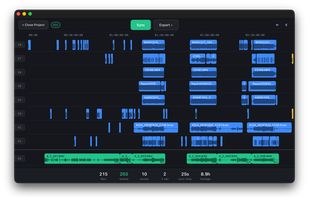
Automatic multicam audio sync for macOS and Windows — sync every camera and audio recorder in one click and export an aligned timeline to Premiere Pro, DaVinci Resolve, or Final Cut Pro.

Cost / License
- Freemium (Pay once or Subscription)
- Proprietary
Application type
Platforms
- Mac
- Windows


Features
Highlights All activities
CamHeard News & Activities
Recent activities
Takes literally seconds to sync! Finally, something that actually works.
Honestly, I’m really impressed with how fast this is. It synced the timecode between all my cameras in just a few seconds, and I had my whole day of footage synced in about a minute. Super convenient and accurate, especially when working with multiple cameras.
This is definitely something new; Pluraleyes and Suncaila aren't as fast.
- Dmitry-Havrylenko A comment was removed from CamHeard
- BBS-3ab A comment was removed from CamHeard
- Dmitry-Havrylenko added Support for 4K as a feature to CamHeard
- Dmitry-Havrylenko added Live Preview as a feature to CamHeard
- Dmitry-Havrylenko added Lightweight as a feature to CamHeard
- dmgg liked CamHeard
- BBS-3ab liked CamHeard


Developed by
 CamHeard
 Licensing
Proprietary and Freemium product.Pricing
One time purchase that costs $249, and / or subscription ranging between $12 and $15 per month + free version with limited functionality.Alternatives
7 alternatives listedBadge
Get an embeddable badge for CamHeardSupported Languages


Comments and Reviews
Honestly, I’m really impressed with how fast this is. It synced the timecode between all my cameras in just a few seconds, and I had my whole day of footage synced in about a minute. Super convenient and accurate, especially when working with multiple cameras.
Takes literally seconds to sync! Finally, something that actually works.
This is definitely something new; Pluraleyes and Suncaila aren't as fast.