CheckDisk icon
CheckDisk icon

CheckDisk

 5 likes

Detects and repairs disk errors by offering standard or full scans that find and mark bad sectors, supporting hard drives, SCSI, RAID arrays, removable devices, and CDs, with a multilingual interface suitable for advanced error diagnostics.
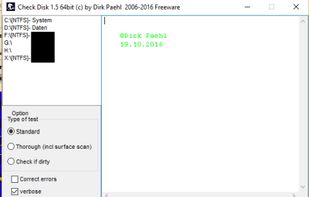
CheckDisk screenshot 1

Cost / License

  • Free
  • Proprietary

Application type

Since

  • Since 2011

Platforms

  • Windows  Download here: [https://drive.google.com/drive/folders/0B19LLjk2RMjfWUJvd3NJSjYzbEk](https://drive.google.com/drive/folders/0B19LLjk2RMjfWUJvd3NJSjYzbEk)
5likes
0articles
Save

Features

Properties

Features

Highlights All activities

CheckDisk News & Activities

Recent activities

No activities found.

Comments and Reviews

   
0

I was hoping to see an unmounted drive, but no luck

vadzim
1

It's just a GUI to system's chkdsk.exe.

jasonbrown1965
0

Used chkdsk on 20hd version of win10 pro, no problems. Also with disc encrypted. Not sure if it's because I always install the latest updates, including directly from chip manufacturer (intel), or if I'm just an oddity, but a bork-free experience is possible.

What is CheckDisk?

CheckDisk is a powerful tool for searching and repairing disk errors. It is quite similar to the ScanDisk tool or chkdsk.exe, supplied with the Windows operating systems (Windows 2000 and higher. Possible with Vista and admin right). You can select either standard or full tests. The full test additionally performs a sector check. It is capable of finding bad sectors on your disk and marking them as such. The program works both with hard disks (including SCSI and RAID) and removable media. Work on CD too. With german manual.

Available languages: English, German, Spanish, Czech, French, Polish, Italian, Slovak, Japanese and Chinese Traditional.

CheckDisk information

Our users have written 3 comments and reviews about CheckDisk, and it has gotten 5 likes.

CheckDisk was added to AlternativeTo by Danilo Venom on and this page was last updated .