
CBackup icon
CBackup icon

CBackup

CBackup is a Windows backup software that helps users automatically back up and protect important files on local drives, external storage devices, or network locations.
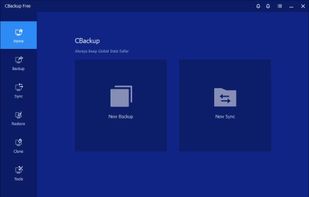
interface

Cost / License

  • Freemium
  • Proprietary

Platforms

  • Windows
0likes
0comments
0articles

Features

  1.  Portable
  2.  Automatic Backup
  3.  No registration required
  4.  Schedule Backup
  5.  Selective Synchronization
  6.  Incremental Backup
  7.  Encrypted Backup
  8.  File Sync
  9.  Synchronization

CBackup News & Activities

Highlights All activities

Recent activities

CBackup information

  • Licensing

    Proprietary and Freemium product.
  • Pricing

    free version with limited functionality.
  • Alternatives

    5 alternatives listed
  • Supported Languages

    • English
    • German
    • French
    • Japanese

AlternativeTo Category

Backup & Sync
CBackup was added to AlternativeTo by AOMEI Technology on and this page was last updated .
No comments or reviews, maybe you want to be first?

What is CBackup?

CBackup is a user-friendly backup solution for Windows systems. It helps users create secure backups of crucial files and folders, protecting data against accidental deletion, system errors, or hardware failure. The software allows automated backup scheduling for daily, weekly, or custom intervals. It uses incremental backup technology to back up only changed data, enhancing efficiency and minimizing storage usage. Its simple interface is suitable for beginners and advanced users, facilitating quick setup and easy backup task management.

Key Functions

  • File Backup: Back up files and folders to local drives, external disks, or network locations
  • Scheduled Backup: Automate backup tasks with daily, weekly, or custom schedules
  • Incremental Backup: Back up only modified files to conserve time and disk space
  • Automatic Backup Tasks: Run backups in the background without manual intervention
  • Flexible Storage Options: Supports internal drives, external HDD/SSD, USB drives, and NAS
  • Data Protection: Prevents data loss due to system crashes, disk failure, or accidental deletion