Full Description
Captn is a browser-based subtitle editor built for creators, podcasters, course teams, social media editors, and video operators who need accurate, editable captions without using a full video-editing suite.
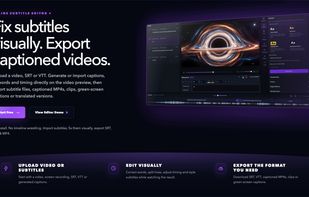
With Captn, you can upload a video, generate subtitles automatically, review and edit the caption text, adjust timing, style captions for social video, translate subtitles, and export the result as SRT, VTT, or a captioned MP4 with burned-in subtitles.
Captn is especially useful when subtitles are the main job: cleaning up auto-generated captions, fixing subtitle timing, preparing reusable caption files, or rendering always-visible captions into a video for platforms like TikTok, Instagram Reels, YouTube Shorts, courses, demos, podcasts, and client review.
The editor keeps the video preview, subtitle blocks, timing controls, style presets, caption effects, translation, and export options in one workflow. You can use it to create a captioned MP4, prepare subtitle files for web players, convert reviewed captions between SRT and VTT, or fix captions that are slightly out of sync before publishing.
Captn is not meant to replace a full timeline-based video editor. It is focused on subtitle workflows: generating, editing, syncing, styling, translating, exporting, and burning captions into videos.
Key Features
- Generate subtitles from video
- Edit subtitle text and timing in the browser
- Preview captions directly on the video
- Style captions for social media videos
- Add caption effects and highlighted words
- Translate subtitles
- Export SRT and VTT subtitle files
- Export captioned MP4 videos with burned-in subtitles
- Import and review existing subtitle files
- Fix subtitle timing before export
- Create reusable subtitle files for platforms, web players, courses, and archives
Best For
- Social media captions
- Podcast clips
- Course videos
- YouTube captions
- TikTok/Reels/Shorts captions
- Captioned MP4 exports
- SRT/VTT subtitle workflows
- Subtitle timing cleanup
- Teams that need captions without a full video editor







 Solid Develop


No comments or reviews, maybe you want to be first?