
CapsJump icon
CapsJump icon

CapsJump

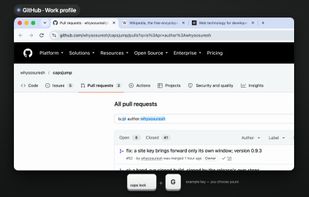
CapsJump gives Caps Lock a job. Hold it and press a key, and it brings an app forward, snaps the front window, opens a link, or lands on a website in the Chrome profile you choose. Let's say G is GitHub in your work profile: hold Caps Lock, press G, and CapsJump brings a...
CapsJump screenshot 1

Cost / License

  • Free
  • Open Source (MIT)

Platforms

  • Mac
0likes
0articles
Save

Features

Features

Highlights All activities

CapsJump News & Activities

Recent activities

CapsJump information

AlternativeTo Category

OS & Utilities

GitHub repository

  •  2 Stars
  •  2 Forks
  •  11 Open Issues
  •   Updated  
View on GitHub
CapsJump was added to AlternativeTo by Suresh Attaluri on and this page was last updated .

No comments or reviews, maybe you want to be first?

Official Links

What is CapsJump?

CapsJump gives Caps Lock a job. Hold it and press a key, and it brings an app forward, snaps the front window, opens a link, or lands on a website in the Chrome profile you choose. Let's say G is GitHub in your work profile: hold Caps Lock, press G, and CapsJump brings a matching tab forward if it finds one, or opens the page in that profile if it doesn't.

I built it because I live in several Chrome profiles and kept landing in the wrong one.

One small file, ~/.capsjump.yaml, says which key does what, and there's a window for editing it too. It's open source (MIT), has no analytics, and quitting it gives Caps Lock back. It needs macOS 13 or later, and installs from GitHub releases or with Homebrew.