CamStation icon
CamStation icon

CamStation

 Like

A live production studio for the Mac: switch cameras, put graphics over the program, mix sound, then stream, record and send the show into any video call.
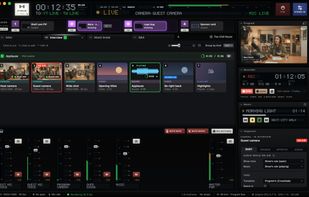
The main window: scenes, the Over bar, the mixer and the program monitor

Cost / License

  • Freemium (Pay once or Subscription)
  • Proprietary

Since

  • New

Platforms

  • Mac  Apple Silicon (M1 or later), macOS 15.2 or later
0likes
0articles
Save

Features

Features

Highlights All activities

CamStation News & Activities

Recent activities

CamStation information

  • Developed by

    AR flagDiego Massanti
  • Licensing

    Proprietary and Freemium product.
  • Pricing

    One time purchase that costs $99, and / or subscription that costs $49 per year + free version with limited functionality.
  • Alternatives

    3 alternatives listed
  • Badge

    Get an embeddable badge for CamStation
  • Supported Languages

    • English
CamStation was added to AlternativeTo by Diego Massanti on and this page was last updated .

No comments or reviews, maybe you want to be first?

What is CamStation?

CamStation is a live production studio for the Mac, laid out like a broadcast control room. Cut cameras, fire names and logos over any shot and mix your sound to broadcast standards, then stream it, record it and send it into any call at once.

  • Live switching: cut, crossfade, wipe, stinger or morph between shots, with the next one prepared while this one is on air.
  • Graphics over the program: names, logos, picture-in-picture and full-frame cards on four channels.
  • Sound: a mixer with voice isolation on every mic and the loudness held to broadcast standards; a music bed that dips while anyone speaks.
  • Virtual camera and microphone: the whole show in Zoom, Meet, Teams, FaceTime, OBS and the browser.
  • Streaming to YouTube, Twitch, Facebook, Kick and any RTMP(S) server at once, each with its own encode.
  • Recording of the program, every mic on its own track, with markers for Final Cut Pro, Resolve and Premiere.
  • Network cameras over RTSP, ONVIF and SRT, and screen capture of a display, window or app with its sound.

Native to Apple Silicon (M1 or later, macOS 15.2 or later). Free to use with a watermark; Pro removes it and adds the production tools, by the month, the year or once, with a 14-day trial on each Mac.