Call Copilot is a Chrome extension that gives you live transcription and AI summaries during calls on Google Meet, Zoom, Microsoft Teams and any other browser-based meeting.
No bot joins your meeting. Audio is captured directly from the browser tab, so other participants see nothing unusual and you never have to explain an AI notetaker to a client.
Where your data goes, in plain terms. Transcripts, recordings and summaries are written straight into your browser's local storage. We run no server that holds user meetings, so there is nothing on our side to leak, lose or hand over. Audio is streamed to Deepgram's EU speech-to-text endpoint with the no-retention flag set, which means it is kept only for the duration of the request and is never used to train models. For AI summarisation you choose between a zero-retention cloud model and Chrome's built-in Gemini Nano, which runs entirely on your own machine.
What we deliberately do not claim: that no data ever crosses the network. Real-time transcription of this quality is not possible fully offline today.
You can pay once. One-time credit packs start at EUR 24 and never expire. A monthly plan exists from EUR 1.99, but you are not pushed into a subscription — which makes the maths work in your favour if you have a handful of important calls each week rather than a full day of them.
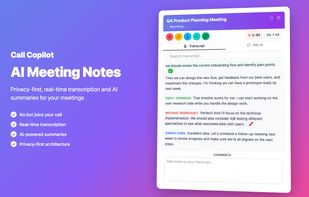
Main features: real-time transcript in a side panel, AI chat with the running transcript during the call, AI summaries with action items, a searchable dashboard across all past meetings, speaker separation, transcript editing, and translation. You can also close the side panel mid-call: recording, transcription and analysis keep running in the background, so nothing is on screen and you can stay fully focused on the conversation.
Built for consultants, lawyers, therapists, accountants, recruiters and other independent professionals who work under NDA and cannot upload client conversations to a third-party cloud.
Honest limitations: speakers are labelled Speaker 1 and Speaker 2 rather than identified by name; there is no cloud sync or team collaboration, which is the direct cost of keeping everything on your device; and it works in browser-based meetings, not in the native desktop apps of Zoom or Teams.





 EU
EU





 Uygar Turantekin added Call Copilot as alternative to Parrot
 Georg Malahov added Call Copilot as alternative to Tactiq, Otter.ai, Fireflies.ai, Granola and 16 more


 Georg Malahov


No comments or reviews, maybe you want to be first?