C3 is a native macOS 2D CAD program written continuously by one author since 1982, when it began as CADD/85 on the HP-85 and appeared in Hewlett-Packard's own software catalog. A drawing made in 1986 opens in it today.
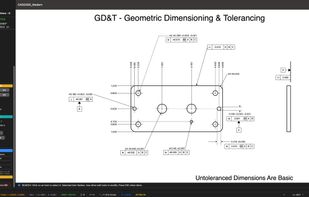
It has the full professional 2D toolset: lines, arcs, circles, polylines, text, hatching, fillets, chamfers, offsets, arrays, trim and extend, layers with layouts and paper space, associative dimensions in every standard style with tolerances and GD&T feature control frames, symbol libraries with dynamic blocks and attributes, tables with formulas, and multi-level undo. It imports and exports DXF and DWG, imports SVG, PDF underlays and images, and exports PDF, SVG, EPS and Gerber/Excellon for PCB fabrication. It also includes schematic capture with KiCad symbol and footprint libraries and netlist export, a wall and floor-plan toolkit, and a companion iPhone app that turns a LiDAR room scan or a photograph into a true-scale drawing.
C3 Assistant is its conversational drafter. You describe the drawing you need, typed or by macOS dictation, and the Assistant drafts it by operating the program's own tools. The result is real CAD geometry, not a picture and not a filled-in template: lines on layers, associative dimensions, symbols and GD&T, all editable afterwards with every ordinary tool, with one Undo per request. The same Assistant has produced machine parts, floor plans, electrical schematics, optics and phasor diagrams, structural diagrams and perspective views. It works with the user's own Anthropic or OpenAI account, or with a local model running on the Mac itself so that drawings never leave the machine.
Pricing is a one-time purchase with no subscription.






 John Christy added C3 by Tetra720 as alternative to Autodesk AutoCAD, LibreCAD, DraftSight, QCAD and 7 more
 Tetra720

No comments or reviews, maybe you want to be first?