BX starts ordinary Mac programs in a sandbox that macOS itself provides. A session sees the project folder you point it at and the app's own settings, and nothing else from your home folder. No virtual machine, no container, no change to the app. One click, and the app is enclosed.
Most people arrive because of AI tools. They read with your rights, and so does everything they start. The sandboxes the tools ship with focus on what gets written and where it goes, while reading stays largely open: ~/.ssh, ~/.aws, shell history, mail and password manager containers. And each of them covers only its own tool, not the editor extension, the MCP server or the terminal next to it. BX sits one layer below and does not care what runs inside.
What it does:
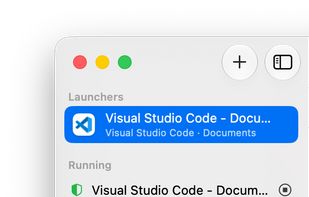
- Launchers keep app, project folder and rules together. Start them from the window, from the menu bar, from the Dock or by typing a short name in a terminal.
- Apps keep their own settings, extensions and logins, so nothing behaves as if freshly installed.
- Rules are readable text files (.bxignore): read-only, read-write or denied, with comments, per launcher or per project tree, and versionable.
- Three switches per launcher: access to your toolchains and git config, handing files and links to other apps, and network reach (unrestricted, this Mac only, or none at all).
- A tree view shows before the start what the app will be able to reach, in green, orange and red. Right-click grants or revokes a folder.
- Whatever a session was denied is recorded and shown in that same tree, with one click to allow it. For sensitive places such as ~/.ssh, BX asks first.
- Ready-made rules for the common programs: VS Code and its variants, JetBrains IDEs, Claude Desktop, ChatGPT, Xcode and a dozen command line agents such as Claude Code, Codex and Gemini CLI, including where they keep their logins, so they do not start logged out.
- Every session tells itself that it is sandboxed and where its rules are, so an AI agent that hits a denied path says which rule it is missing instead of hunting a bug.
- The menu bar says what you are working in, and points it out when an app runs unprotected although a launcher exists for it.
- Everything is on the command line as well: bx run, bx dry, bx list, or just the launcher's name.
Where the protection ends: BX is a read filter on the file system. A session can still run code and reach the network, it simply sees less. It protects against curiosity and accidents, not against an attacker. Apps that already carry Apple's own sandbox cannot take a second one and are not offered for selection. An app running under BX cannot install its own updates, and software cannot be installed from inside a session.
Requires macOS 14 or newer. One-off purchase, no subscription, with a three-day trial. After the trial BX protects exactly as before; only the conveniences marked with a small cart stay off until purchase.






 EU
EU


 Dirk Holtwick added BX Sandbox as alternative to Little Snitch and LuLu
 Dirk Holtwick


No comments or reviews, maybe you want to be first?