





BURSU Connection Manager
1 like
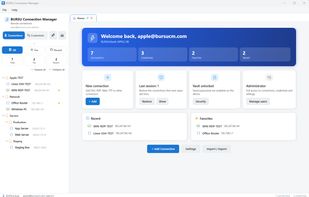
Secure credential manager for SSH, RDP, VNC, Telnet, Serial, FTP, and SFTP providing tabbed sessions, side-by-side SFTP, split view, ProxyJump, port forwarding, broadcast keystrokes, import tools, offline local or cloud storage, and role-based access.

Cost / License
- Free
- Proprietary
Application typeApplication types
Platforms
- Mac
- Windows
- Linux
- Online
- Android
- Android Tablet
- iPhone
- iPad


Features
Highlights All activities
BURSU Connection Manager News & Activities
Recent activities
- Gia-Bursulaia updated BURSU Connection Manager
 Denis-Torresan added BURSU Connection Manager as alternative to Hostpad
- Danilo Venom updated BURSU Connection Manager
- Gia-Bursulaia updated BURSU Connection Manager
- Gia-Bursulaia commented on BURSU Connection Manager
Hi everyone — I'm the developer of BURSUcm, so treat this as a disclosure rather than a review.
I built it because I was juggling a terminal for SSH, a separate RDP client, and a spreadsheet full of credentials across a mixed Linux/Windows estate. The idea was one workspace for all of it: SSH, RDP, VNC, Telnet, Serial, FTP and SFTP in tabs, with RDP and VNC rendered inside the app rather than handed off elsewhere.
Two things I'd especially like feedback on: the built-in RDP engine, and the...
- Gia-Bursulaia liked BURSU Connection Manager
- Gia-Bursulaia added BURSU Connection Manager
 Gia-Bursulaia added BURSU Connection Manager as alternative to MobaXterm, Tabby, Remmina, Royal TSX and 47 more


Developed by
 BURSUsofts
 Licensing
Proprietary and Free product.Alternatives
52 alternatives listedBadge
Get an embeddable badge for BURSU Connection ManagerSupported Languages
AlternativeTo Categories
Network & Admin, Security & Privacy, Development, File Sharing, OS & Utilities, System & Hardware, Remote Work & EducationApple AppStore
- Updated
- 0 avg rating




Comments and Reviews
Hi everyone — I'm the developer of BURSUcm, so treat this as a disclosure rather than a review.
I built it because I was juggling a terminal for SSH, a separate RDP client, and a spreadsheet full of credentials across a mixed Linux/Windows estate. The idea was one workspace for all of it: SSH, RDP, VNC, Telnet, Serial, FTP and SFTP in tabs, with RDP and VNC rendered inside the app rather than handed off elsewhere.
Two things I'd especially like feedback on: the built-in RDP engine, and the storage model — you can keep everything in a local SQLite file, point it at your own PostgreSQL, or use our sync backend, and the app is fully usable offline with no account.
It's free on Windows, macOS, Linux and Android. If something is broken or missing, I'd rather hear it here than not hear it at all.