
Hostpad icon
Hostpad icon

Hostpad

A connection manager for Windows. Keep SSH, SFTP, SCP, FTP, Remote Desktop and VNC hosts in one encrypted list and open them with the tools you already use.
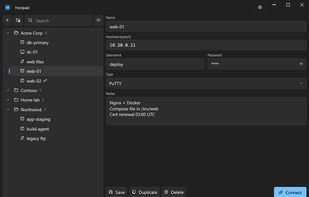
Main screen

Cost / License

Platforms

  • Windows
0likes
0comments
0articles

Features

Properties

  1.  Privacy focused
  2.  Lightweight

Features

  1.  Password Sharing
  2.  Ad-free
  3.  Dark Mode
  4.  No Tracking
  5.  Portable
  6.  Encrypted Backup
  7.  AES-256 Encryption
  8.  Works Offline
  9.  VNC Support
  10.  Secure Copy (SCP)
  11.  RDP
  12.  Support for SFTP
  13.  SSH

Hostpad News & Activities

Highlights All activities

Recent activities

  • dRemote icon
    Denis-Torresan added Hostpad as alternative to dRemote
  • Denis-Torresan updated Hostpad
  • Denis-Torresan added Hostpad

Hostpad information

  • Developed by

    IT flaggoodmagma
  • Licensing

    Open Source (GPL-3.0) and Free product.
  • Written in

  • Alternatives

    27 alternatives listed
  • Supported Languages

    • English

AlternativeTo Categories

Network & AdminSecurity & PrivacyBackup & SyncRemote Work & Education

GitHub repository

  •  2 Stars
  •  0 Forks
  •  0 Open Issues
  •   Updated  
View on GitHub

Popular alternatives

View all
Hostpad was added to AlternativeTo by Denis-Torresan on and this page was last updated .
No comments or reviews, maybe you want to be first?

What is Hostpad?

Hostpad is a connection manager for Windows: an address book for remote machines rather than another terminal. It keeps the list, the credentials and the notes, and hands the connecting to PuTTY, WinSCP, mstsc and your VNC viewer — the tools you already have and already trust.

Connections live in nested folders, with drag and drop, rename in place, and a search across name, hostname, username and notes. Six connection types are supported: SSH through PuTTY, Remote Desktop, VNC, and SFTP, SCP and FTP through WinSCP. Double click opens a host with its usual type; the right-click menu opens the same host with any of the others.

Things that are usually smuggled into other fields are real fields here: SSH jump hosts, private keys, post-login commands, X11 forwarding, Remote Desktop screen size and mounted drives.

The connection list is always encrypted with AES-256-GCM. Without a master password the vault is tied to your Windows account through DPAPI, so there is no prompt and a copied file is useless to anyone else. With a master password it also opens on another computer, which is what makes a backup worth keeping.

An existing AutoPuTTY configuration can be imported, passwords and folders included. Hostpad is freely inspired by AutoPuTTY but shares no code with it: it is written from scratch on .NET 10 and WPF.

Free and open source under the GPLv3.

Official Links

