





Burly
2 likes
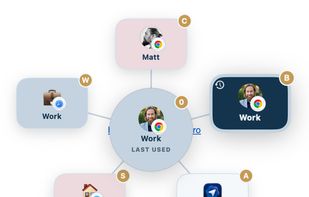
Burly is a tiny macOS menu bar app that becomes your link handler. When you click a link, it lets you pick the exact browser and profile that should open it, instantly, with the keyboard.

Cost / License
- Free
- Proprietary
Platforms
- Mac


Features
Highlights All activities
Burly News & Activities
Recent activities
 livrasand added Burly as alternative to Browseraptor
- Matt Senter updated Burly
- Matt Senter liked Burly
- ESPAlan liked Burly
- Matt Senter added Burly
 Matt Senter added Burly as alternative to Velja, Hurl - Choose a Browser, Browserino, Browser Tamer and 19 more


Developed by
 Matt Senter
 Licensing
Proprietary and Free product.Alternatives
25 alternatives listedBadge
Get an embeddable badge for BurlySupported Languages


No comments or reviews, maybe you want to be first?