
BulkPic icon
BulkPic icon

BulkPic

BulkPic is our freeware Windows application for processing large numbers of images quickly.
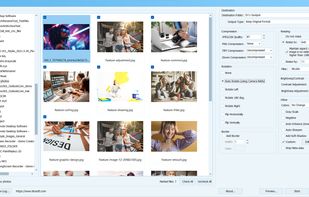
BulkPic screenshot 1

Cost / License

  • Free
  • Proprietary

Platforms

  • Windows
0likes
0comments
0alternatives
0articles

Features

Properties

  1.  Privacy focused
  2.  Lightweight

Features

  1.  No registration required
  2.  Works Offline
  3.  No Tracking
  4.  Live Preview
  5.  Ad-free
  6.  Batch Editing
  7.  Image Conversion
  8.  Image Processing

BulkPic News & Activities

Highlights All activities

Recent activities

BulkPic information

  • Developed by

    CY flagTkoSoft
  • Licensing

    Proprietary and Free product.
  • Alternatives

    0 alternatives listed
  • Supported Languages

    • English

AlternativeTo Category

Photos & Graphics
BulkPic was added to AlternativeTo by tkosoft on and this page was last updated .
No comments or reviews, maybe you want to be first?

What is BulkPic?

BulkPic is our freeware Windows application for processing large numbers of images quickly.

Key features:

  • Batch conversion of multiple images
  • Bulk resizing with aspect ratio support
  • Image rotation, flipping, cropping, and auto-rotation
  • Brightness, contrast, gamma, RGB, hue, saturation, value, and luminosity adjustments
  • Advanced correction tools: Color Curve, Levels, Equalization, HSV, HSL, RGB, and Gamma
  • Sharpening, smoothing/denoise, pixelize, grayscale, sepia, negative, and colorize effects
  • Soft shadow effect with adjustable radius, offset, position, and color
  • Custom effects tools including User Filter, Bump Map, Lens, FFT, and filter presets such as blur, emboss, edges, high -pass, and low pass-
  • JPEG/JPEG 2000 quality settings, PNG and TIFF compression options
  • DICOM compression support
  • Color depth conversion and metadata removal
  • Preview before batch processing

BulkPic can be useful for preparing website images, compressing photo collections, converting graphics, correcting colors, resizing images for email or documents, and applying the same visual adjustments to many pictures at once.

