
Boomkey icon
Boomkey icon

Boomkey

 2 likes

Boomkey fixes text typed in the wrong keyboard layout on macOS. Typed half a sentence before noticing the keyboard was on the wrong layout? Select the gibberish and double-tap Shift (or your own shortcut) - Boomkey converts it to the right layout and restores your clipboard.
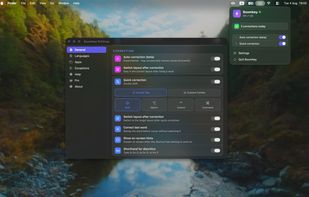
Boomkey screenshot 1

Cost / License

  • Freemium (Pay once)
  • Proprietary

Application type

Since

  • Since 2026

Platforms

  • Mac  Requires macOS 14 Sonoma or later
2likes
0articles
Save

Features

Properties

Features

Highlights All activities

Boomkey News & Activities

Recent activities

Boomkey information

  • Developed by

    GB flagPoteam Lab
  • Licensing

    Proprietary and Freemium product.
  • Pricing

    One time purchase (perpetual license) ranging between $14 and $15 + free version with limited functionality.
  • Alternatives

    12 alternatives listed
  • Badge

    Get an embeddable badge for Boomkey
  • Supported Languages

    • English
    • Ukrainian
    • Russian
    • Polish

AlternativeTo Category

OS & Utilities
Boomkey was added to AlternativeTo by krust702 on and this page was last updated .

No comments or reviews, maybe you want to be first?

Official Links

What is Boomkey?

Boomkey fixes text typed in the wrong keyboard layout on macOS. Typed half a sentence before noticing the keyboard was on the wrong layout? Select the gibberish and double-tap Shift (or your own shortcut) - Boomkey converts it to the right layout and restores your clipboard. With nothing selected, it fixes the last word you typed.

The hotkey works with any pair of installed layouts: Latin (English, German, French, Polish, Spanish and ~55 more, including AZERTY, QWERTZ and Dvorak), Cyrillic, Greek, Hebrew, Arabic, Georgian, Armenian and Korean.

Auto-correction (beta) fixes a wrong-layout word as soon as you hit space, using a bundled dictionary for each language. It covers English paired with Ukrainian, Russian, Belarusian, Hebrew or Arabic.

Also included: a custom shortcut to switch keyboard layouts (even modifier-only combos like Cmd+Shift), per-app rules and pinned layouts, and a list of words Boomkey should never touch. Terminals and code editors are off by default.

Native Swift app. All text is processed locally on your Mac: no keystrokes stored, no analytics or trackers.

7-day free trial with no card, then a one-time license for 2 Macs with free updates. A lighter Mac App Store version fixes selected text through macOS Services and is free for 20 fixes a day.

Boomkey Videos