
Bookmark Canvas icon

Bookmark Canvas

Chrome bookmark manager that replaces a text-heavy list with browsable page thumbnails, folder navigation, search, sorting, drag-and-drop organization, multi-select, adjustable card sizes, right-click capture, Rediscover resurfacing, backup, merging, transfer previews, and themes.
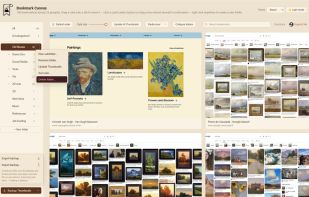
Your Chrome folders on the left, and a thumbnail of every saved page on the right, shown in the Beach color theme.

Cost / License

  • Pay once
  • Proprietary

Application type

Platforms

  • Windows
  • Google Chrome
0likes
0articles
Save

Features

Properties

Features

Highlights All activities

Bookmark Canvas News & Activities

Recent activities

Bookmark Canvas information

  • Licensing

    Proprietary and Commercial product.
  • Pricing

    One time purchase (perpetual license) ranging between $3 and $5.
  • Alternatives

    14 alternatives listed
  • Badge

    Get an embeddable badge for Bookmark Canvas
  • Supported Languages

    • English
Bookmark Canvas was added to AlternativeTo by Bookmark-1995 on and this page was last updated .

No comments or reviews, maybe you want to be first?

What is Bookmark Canvas?

Bookmark Canvas functions as a visual bookmark manager specifically designed for Chrome. Instead of utilizing a conventional list of titles, this tool presents each saved webpage as a thumbnail of the page itself, allowing users to swiftly identify a site simply by its visual representation.

The software integrates seamlessly with Chrome, displaying your bookmark folders on the left, while thumbnails of every saved page populate the right side of the screen. A right-click on any page allows it to be bookmarked with a thumbnail for easy future reference. The Rediscover feature reintroduces bookmarks that have not been accessed in a prolonged period. The software also allows for the backup, merging, and transfer of bookmarks to a new computer, offering a preview before any alterations are made. Additional features include search functionality, drag-and-drop between folders, multi-select, and a card size slider. Users also have the option to customize their interface with different color themes, such as Beach, Forest, Glacial, Shadow, and Pink.

Bookmark Canvas Videos