Bonk icon
Bonk icon

Bonk

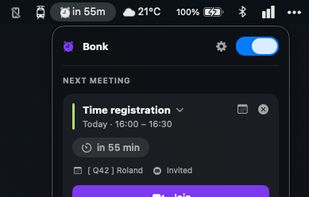
Never miss a meeting again. Bonk warns you right before a meeting with a full-screen alert you can't miss — join, snooze or ignore in one click. Or keep it subtle with a pill at the top of your screen. You decide, per meeting.
Bonk screenshot 1

Cost / License

  • Free
  • Open Source (MIT)

Application type

Platforms

  • Mac
0likes
0comments
0articles

Features

Properties

  1.  Privacy focused

Features

  1. Google Calendar icon  Sync with Google Calendar
  2.  No Tracking
  3.  Ad-free
  4.  Dark Mode
  5.  No registration required
  6.  Reminders
  7.  Multiple Account support

Bonk News & Activities

Highlights All activities

Recent activities

Bonk information

  • Developed by

    NL flagKierkels
  • Licensing

    Open Source (MIT) and Free product.
  • Written in

  • Alternatives

    10 alternatives listed
  • Supported Languages

    • English
    • Dutch

AlternativeTo Category

Office & Productivity

GitHub repository

  •  0 Stars
  •  0 Forks
  •  0 Open Issues
  •   Updated  
View on GitHub
Bonk was added to AlternativeTo by Kierkels on and this page was last updated .
No comments or reviews, maybe you want to be first?

What is Bonk?

Bonk — never get bonked by a meeting again

Bonk is a tiny macOS menu-bar app that makes sure you actually show up. It watches your calendar and, right before a meeting, throws an alert you can't miss — then joins the call in one click. No accounts, no cloud, no setup. Just your Mac's own calendars.

Why you'll love it

  • 🔔 Alerts you can't ignore. Choose a calm pill at the top of your screen or a full-screen takeover — your call. Both float above full-screen apps, so a meeting can't sneak past while you're heads-down.
  • 🎥 One-click join. Bonk pulls the Meet, Teams, or Zoom link straight from the invite. Hit Join and you're in — or let it auto-join the second your meeting starts.
  • 📊 A menu bar that works for you. See your next meeting as just an icon, a live countdown, the time, or the title — in your own calendar colour. Pick the icon that fits you (bell, alarm, calendar, clock, sparkles…), and watch it glow as a meeting closes in.
  • 🎛? Rules, your way. Decide which meetings deserve an alert. Filter by title, weekday, calendar, or RSVP status (accepted / invited / declined / FYI). Different lead times and looks per rule — even a "stay quiet" rule for the noise.
  • 🎨 Make the alert yours. Reusable styles with gradients, blur, images or solid colours, your accent, and exactly the fields you want to see. Pick a sound, loop it as an alarm until you react, and even break through a muted Mac when it really matters.
  • ? Quick reminders, too. Something not on your calendar? Add a reminder in seconds — "in 15 minutes" or at an exact time — and fire it from anywhere with a global shortcut. They snooze, reschedule, and clear themselves once shown.
  • 📅 Works with what you already have. Google, iCloud, Exchange — any calendar your Mac already syncs, via EventKit. No OAuth, no extra login. Choose which calendars to follow and their colours.
  • 🌗 Polished & personal. English or Dutch, light or dark, launch-at-login, and a clean menu showing today (or the next few days), with snooze, dismiss, and "open in Calendar" on every meeting.
  • 🔄 Stays current. Tells you when a new version is out — quietly, never nagging.

Official Links

