
MeetingWarning icon
MeetingWarning icon

MeetingWarning

 Like

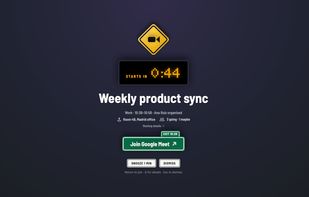
MeetingWarning is a Mac menu bar app for people who miss calls because a notification slid by while they were focused. Shortly before a meeting starts (1 minute by default, or 30 seconds to an hour), it covers every connected display with the meeting name, a live countdown and...
MeetingWarning screenshot 1

Cost / License

  • Pay once
  • Proprietary

Application type

Since

  • New

Platforms

  • Mac
0likes
0articles
Save

Features

Properties

Features

Highlights All activities

MeetingWarning News & Activities

Recent activities

MeetingWarning information

MeetingWarning was added to AlternativeTo by javimey on and this page was last updated .

No comments or reviews, maybe you want to be first?

Official Links

What is MeetingWarning?

MeetingWarning is a Mac menu bar app for people who miss calls because a notification slid by while they were focused. Shortly before a meeting starts (1 minute by default, or 30 seconds to an hour), it covers every connected display with the meeting name, a live countdown and one big Join button. Press Return to join, Esc to dismiss, or snooze for a minute. When meetings overlap, one is shown on the stage and the others beside it.

It finds the call link in the invite and opens it: Google Meet, Zoom, Microsoft Teams, Webex, Slack huddles, Whereby, Jitsi and more.

Calendars: sign in to Google Calendar directly (read-only, several accounts, Google Workspace too), and/or use every calendar in the Mac's Calendar app: iCloud, Microsoft 365, Exchange, Outlook.com, Yahoo, Fastmail and CalDAV.

You choose which meetings count. By default it skips meetings without a call link, meetings you declined and all-day events; with Google connected it also skips focus time and out-of-office blocks. Optionally skip meetings with no one else invited, meetings marked free, or titles with words you choose. The menu bar lists today's and tomorrow's meetings, each marked will or won't alert with the reason, and lets you skip one meeting, mute a repeating one, ask for an alert anyway, or pause alerts.

Private: read-only calendar access, no account, no analytics, no MeetingWarning server. Calendar data stays on your Mac.

$5.99 once on the Mac App Store, no subscription. Requires macOS 14 or later. A Windows version is coming to the Microsoft Store.