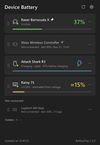
BatteryTray icon
BatteryTray icon

BatteryTray

 Like

Battery level of wireless headsets, mice, keyboards, controllers and AirPods in the Windows tray and the Mac menu bar, with low battery reminders.
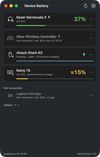
Mac app
+2
Windows app

Cost / License

  • Free
  • Open Source (MIT)

Since

  • New

GitHub

  • GitHub stars: 8

Platforms

  • Windows
  • Mac  macOS 13 Ventura or later
0likes
0articles
Save

Features

Properties

Features

Highlights All activities

BatteryTray News & Activities

Recent activities

BatteryTray information

AlternativeTo Category

System & Hardware

GitHub repository

  •  8 Stars
  •  2 Forks
  •  5 Open Issues
  •   Updated  
View on GitHub
BatteryTray was added to AlternativeTo by paranoiaqq on and this page was last updated .

No comments or reviews, maybe you want to be first?

Official Links

What is BatteryTray?

BatteryTray shows the battery level of your wireless devices next to the clock on Windows or in the menu bar on a Mac, and reminds you before a battery runs out.

It reads gaming headsets, mice and keyboards through their 2.4 GHz receivers without the vendors' software, so Razer Synapse, Logitech G HUB, SteelSeries GG, HyperX NGENUITY or Corsair iCUE don't have to run. Bluetooth devices, AirPods (each earbud and the case) and game controllers show up too, and on a Mac also an iPhone or iPad on a cable.

  • The level of the device that needs charging first as a colored number in the tray or the menu bar
  • Every device in one window with its level, charging state and the last known level of the ones that are off
  • A low battery reminder that Do Not Disturb doesn't hide, with a reminder and a critical level for each device
  • A battery overlay on a keyboard shortcut over games and full-screen apps
  • Updates itself; English, Russian and Chinese

Free and open source (MIT).