BatteryBud icon
BatteryBud icon

BatteryBud

 Like

A Mac app that shows the battery and power draw of your Mac, iPhone, iPad, AirPods, Apple Watch, Gaming Controllers, Headsets, UPS and accessories, with history and battery health.
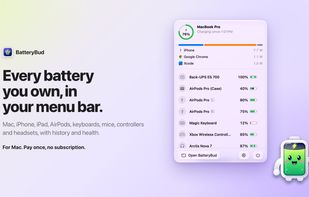
BatteryBud in the menu bar: your Mac's battery and power use, plus every connected device's level, in one panel.

Cost / License

  • Pay once
  • Proprietary

Application type

Since

  • New

Platforms

  • Mac
0likes
0articles
Save

Features

Properties

Features

Highlights All activities

BatteryBud News & Activities

Recent activities

BatteryBud information

  • Developed by

    IN flagClimactic
  • Licensing

    Proprietary and Commercial product.
  • Pricing

    One time purchase (perpetual license) ranging between $5 and $19.
  • Alternatives

    6 alternatives listed
  • Badge

    Get an embeddable badge for BatteryBud
  • Supported Languages

    • English

AlternativeTo Category

System & Hardware
BatteryBud was added to AlternativeTo by adiology on and this page was last updated .

No comments or reviews, maybe you want to be first?

Official Links

What is BatteryBud?

BatteryBud puts every battery you own in the Mac menu bar. One click shows this Mac, your other Macs, iPhone, iPad, Apple Watch, AirPods and Beats (each bud and the case), keyboards, mice, trackpads, game controllers, a UPS, and Logitech, Razer, Corsair, SteelSeries and HyperX devices on their USB receivers.

The iPhone and iPad need a cable once. After that, BatteryBud reads them over Wi-Fi. It reads AirPods from their Bluetooth broadcasts too, so it shows them while they play from your iPhone or sit in their closed case.

For each device, BatteryBud keeps charts for the day, week, month and year, and a list of charging sessions. It records maximum capacity and charge cycles for your Mac, iPhone and iPad. On a MacBook, Power flow shows which apps and which charging devices use the power, live in watts or over time.

Alerts tell you when a device is low, when it has charged to a level you pick, when it has not been seen for a while, or when battery health drops. You can pin any device to the menu bar with its percentage, and add desktop widgets.

There is no account, and battery data stays on your Mac. BatteryBud costs once, with a year of updates. It needs macOS 14 or later and a Mac with Apple silicon.

BatteryBud Videos

Show 1 more video