BannerHither icon
BannerHither icon

BannerHither

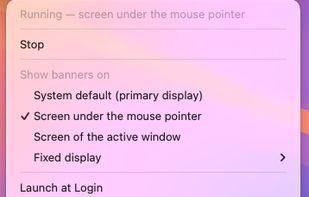
A free, open-source macOS menu bar utility for multi-monitor setups that moves notification banners to the display beneath the pointer, the active window’s display, or a fixed monitor. It keeps clicks, swipes, and close controls working with Accessibility access.

BannerHither screenshot 1

Cost / License

  • Free
  • Open Source (MIT)

Platforms

  • Mac
  • Homebrew
Menu bar
Alternatives
0likes
0alternatives
0articles

Features

Properties

  1.  Lightweight
  2.  Privacy focused

Features

  1.  Works Offline
  2.  Support for Multiple Monitors
  3.  Ad-free
  4.  No Tracking
  5.  No registration required
  6.  Sits in the menu bar
  7.  Apple Silicon support
  8.  Notifications

BannerHither News & Activities

Highlights All activities

Recent activities

BannerHither information

AlternativeTo Category

System & Hardware

GitHub repository

  •  0 Stars
  •  0 Forks
  •  0 Open Issues
  •   Updated  
View on GitHub
BannerHither was added to AlternativeTo by KJeon10 on and this page was last updated .
No comments or reviews, maybe you want to be first?

Official Links

What is BannerHither?

BannerHither is a free, open source menu bar app for macOS that moves notification banners to the display you are actually looking at. macOS always shows banners on the primary display, which on a multi-monitor setup is often the wrong screen.

Three modes: the screen under the mouse pointer, the screen of the active window, or one fixed display. Banners are moved the moment they appear and land exactly where macOS would draw them on that screen, so clicking and swiping still work.

Menu bar only, Launch at Login, a test notification for checking placement, universal binary. Requires only the Accessibility permission, no network access, no data collection. MIT licensed. Interface in English, Korean, Japanese, Simplified Chinese, German, French and Spanish.

Requires macOS 14 or later. Install from the GitHub Releases DMG or via Homebrew tap.