
Aura File Transfer Manager
Aura replaces the Windows file copier with a robust, high-integrity transfer engine wrapped in a polished, intuitive interface. It gives you full control over every operation—pause, resume, verify, skip errors, and resolve conflicts interactively—without compromising speed or reliability.
Cost / License
- Free
- Open Source
Platforms
- Windows


Aura File Transfer Manager
Features
Properties
- Lightweight
Features
- No Tracking
- Works Offline
- Ad-free
- No registration required
- Accelerate file transfer
Aura File Transfer Manager News & Activities
Recent activities
NJAC added Aura File Transfer Manager as alternative to ExtremeCopy
NJAC added Aura File Transfer Manager as alternative to TeraCopy
NJAC added Aura File Transfer Manager as alternative to RapidCopy
NJAC added Aura File Transfer Manager as alternative to Copywhiz
NJAC added Aura File Transfer Manager as alternative to XCOPY
NJAC added Aura File Transfer Manager as alternative to UltraFastCopy- NJAC updated Aura File Transfer Manager
NJAC added Aura File Transfer Manager as alternative to CopyFolder
NJAC added Aura File Transfer Manager as alternative to TurboCopy Pro
NJAC added Aura File Transfer Manager as alternative to SuperCopier
Aura File Transfer Manager information
What is Aura File Transfer Manager?
Aura File Transfer Manager Precision file transfers for demanding workflows.
Aura is a modern replacement for the Windows file copier that gives full control over every transfer. Whether moving one file, an entire folder tree, or thousands of assets, Aura keeps transfers fast, reliable, and manageable through a clean interface.
? Fast Transfers That Stay Responsive
-
Transfer multiple files at once Aura copies up to ten files simultaneously, cutting transfer time while keeping storage fully utilized.
-
Responsive during heavy jobs Large transfers never freeze the interface. You can keep browsing folders, changing settings, or working while Aura runs in the background.
-
Resume interrupted transfers If a transfer stops because of a disconnected drive, shutdown, crash, or manual pause, Aura resumes from the exact point it stopped.
🛡? Reliable File Verification
-
Built-in integrity checks Aura can verify copied files using industry-standard hash algorithms so you know every file copied correctly.
-
Automatic corruption handling Failed verification deletes the corrupted copy immediately and marks the file clearly.
-
Smart skipping of unchanged files Existing files with matching size and date can be skipped automatically to avoid unnecessary overwrites.
🔀 Clear Conflict Resolution
-
Detailed comparison view When duplicate names exist, Aura shows source and destination details including path, size, and modification date.
-
Simple actions Overwrite the old file, keep the current one, or auto-rename the new file to keep both copies.
-
Apply to all conflicts One decision can automatically apply to the rest of the transfer.
🧵 Full Job Control
- Pause and resume transfers independently
- Cancel jobs cleanly without leftover partial files
- Safe move operations that copy first before removing originals
🖥? Built for Windows
- Supports clipboard copy and cut operations
- Detects whether files were copied or moved
- Adds a “Paste with Aura” option to the Explorer right-click menu
- Works directly from standard Windows workflows
📊 Detailed Live Progress
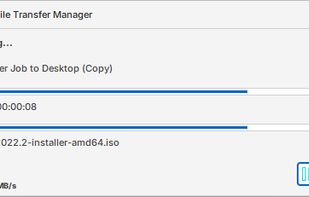
- Overall and per-file progress in real time
- Live speed and ETA updates
- Status tracking for waiting, active, completed, failed, and skipped files
- Separate windows for managing multiple jobs simultaneously
?? Configurable Performance
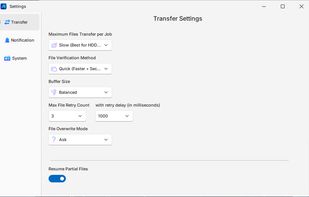
- Six speed modes balancing performance and memory use
- Adjustable concurrent transfer count
- Customizable overwrite rules, verification modes, and retry behavior
🧰 Built-in Logging
Aura stores detailed logs for every transfer, file, and error so completed jobs can be reviewed or troubleshooting information shared when needed.

Comments and Reviews
A newer version has been added to the GitHub Release. Please check it out 👍