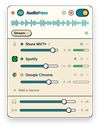
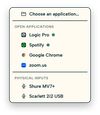
AudioPass creates a virtual microphone on your computer. Any app that accepts a microphone (Zoom, OBS, Discord, Teams) can select it and receive the sound you choose: your DAW, Spotify, your audio interface or your USB mic.
Pick a source, flip one switch, and you are connected. There are no system settings to change and nothing to set up in the source app. You keep hearing your computer normally through your speakers or headphones, and the level you send is independent from the level you hear.
Free, with no watermark and no time limit:
- One source at a time, mono or stereo, at full quality (32-bit, 44.1 to 96 kHz)
- Capture any running app, or any input of your audio interface
- DAW mode: a dedicated output that sends your session as it is to your call or stream, up to 96 kHz
- Always-on safety limiter that protects your ears and your stream
- Light and dark themes, English and French
Premium, one-time purchase (€45, 3 devices, no subscription):
- Several sources mixed together: your voice, your instrument and a backing track in the same microphone, each with its own level
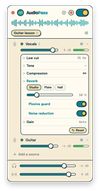
- Per-source effects: high-pass, tone, compression, reverb, plosive guard, noise reduction, auto gain
- Presets that recall a full setup in one click
- Multitrack recorder: each source on its own track plus the exact mix, as 24-bit WAV
Who it is for:
- Music teachers and students: voice and instrument together on a video call
- Musicians and producers: play a mix or a session to a client or a bandmate remotely
- Streamers and creators: send a DAW, music and a microphone to OBS or Discord
Privacy: everything runs locally. No sound leaves your computer, there is no account and no telemetry.
Requirements: macOS 14.4 or later (Apple Silicon and Intel), with one signed and notarized installer for the app and its audio driver. Windows 10 or later: the app works with the free VB-Cable driver and guides you through installing it.










 Goldey added AudioPass as alternative to Loopback, BlackHole Audio Loopback Driver, SoundSource, VB-Audio VoiceMeeter and 1 more


No comments or reviews, maybe you want to be first?