





Audio Tag Editor App
Like
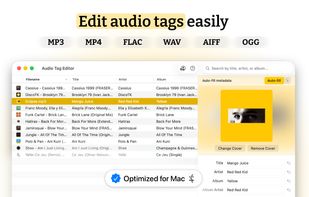
Edit audio tags seamlessly. Mp3tag alternative for iPhone, iPad & Mac. Batch-edit ID3, FLAC, OGG & more with auto-fill and artwork. Fully offline.

Cost / License
- Pay once
- Proprietary
Application typeApplication types
 EU
EUPlatforms
- Mac
- iPhone
- iPad


Features
Highlights All activities
Audio Tag Editor App News & Activities
Recent activities
- Rebels added Audio Tag Editor App
- Paul updated Audio Tag Editor App
 Rebels added Audio Tag Editor App as alternative to MusicBrainz Picard, Kid3, TagScanner, Puddletag and 43 more

Developed by
 Rebels
 Licensing
Proprietary and Commercial product.Pricing
One time purchase (perpetual license) that costs $7.Alternatives
47 alternatives listedBadge
Get an embeddable badge for Audio Tag Editor AppSupported Languages


No comments or reviews, maybe you want to be first?