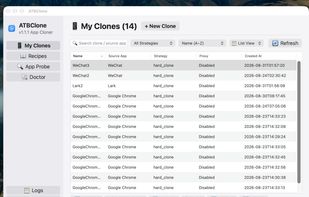
ATBClone is a modern application multi-instancing and clone management engine designed for macOS. It supports isolated user data directories, independent network proxies (HTTP / SOCKS5), automated recipe matching, ad-hoc code re-signing, and sandbox removal.
Key Features
📦 Dual-Engine Cloning Mechanism:
Hard Clone: Designed for native and social applications (WeChat, QQ, Telegram, AI clients, Chrome, Edge, Arc, etc.). Duplicates the entire App Bundle, modifies Info.plist and Bundle Identifier, injects isolated HOME / TMPDIR data directories via in-process dynamic library injection (libatbclone_env.dylib) or Mach-O binary launcher hijack, optionally strips App Sandbox restrictions, and performs ad-hoc code re-signing.
Soft Clone: Designed for modern code editors and browsers (Cursor, VS Code, Firefox, Brave, Tor, Zed, etc.). Generates a lightweight wrapper bundle, automatically injecting isolated --user-data-dir / --profile launch arguments and proxy environment variables.
🔍 Intelligent App Prober: Automatically inspects Mach-O architectures, frameworks, and code signing sandbox entitlements for any application without a pre-configured recipe, dynamically determining the optimal soft/hard clone strategy and generating recommended recipes.
🌐 Isolated Network Proxies: Configure dedicated HTTP or SOCKS5 proxies (with authentication support) per cloned application without interfering with host system or primary application traffic.
📑 Recipe Engine: 34+ built-in recipes for popular apps and AI Agent tools, with local override support via ~/ATBClone/recipes/.
🪄 Interactive Wizard: Step-by-step interactive CLI guide supporting terminal drag-and-drop application paths, automatic name incrementing, custom data directory configuration, and on-the-fly proxy setup.
🔄 Lifecycle Management: View cloned apps (list), re-clone after primary app updates while preserving user and chat data (update), and safely remove clones with interactive prompts or flag controls (remove with --with-data / --keep-data).
🛡️ Security & Privilege Elevation: Writing to ~/ATBClone/Apps requires no admin privileges; writing to /Applications uses native single-prompt macOS osascript authorization; robust path escaping via shlex.quote throughout.