
Sessions Pro for Cursor icon

Sessions Pro for Cursor

 Like

If you have more than one Cursor account (for work, for yourself or for several clients), Cursor makes you sign out and back in every time you switch. Sessions Pro for Cursor fixes that by giving each account its own data folder, so signing in to one never signs you out of...
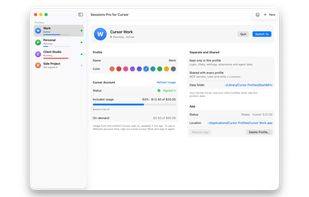
Each Cursor account as its own profile, with its own login, usage and data folder

Cost / License

  • Pay once
  • Proprietary

Since

  • New

Platforms

  • Windows  Requires Cursor on Windows 10 or 11
  • Mac  Requires Cursor and macOS 14 or later
0likes
0articles
Save

Features

Features

Highlights All activities

Sessions Pro for Cursor News & Activities

Recent activities

Sessions Pro for Cursor information

AlternativeTo Categories

Development, Office & Productivity

Popular alternatives

View all
Sessions Pro for Cursor was added to AlternativeTo by Sebastian-Balog on and this page was last updated .

No comments or reviews, maybe you want to be first?

What is Sessions Pro for Cursor?

If you have more than one Cursor account (for work, for yourself or for several clients), Cursor makes you sign out and back in every time you switch. Sessions Pro for Cursor fixes that by giving each account its own data folder, so signing in to one never signs you out of another, and all of them can run at once.

On a Mac, each profile (for example "Cursor Work" and "Cursor Personal") is a real app with a coloured letter on its Dock icon and its own place in Cmd-Tab. A menu bar item shows which account is in front, switches between them and shows each account's monthly usage, so you can see which one has room left. On Windows, each profile opens in its own Cursor window titled with the account's name, and a tray icon switches between them.

Each account keeps its own login, chats, settings, extensions and agent data. MCP servers, rules and skills stay shared, so you set them up once. On a Mac, profiles are rebuilt automatically when Cursor updates, without the update prompt.

One-time purchase of $15, no subscription, for 2 computers, Mac or PC in any mix, with a 1-hour free preview and a 14-day refund. Requires macOS 14 or later, or Windows 10/11 with Cursor installed.

Not affiliated with Anysphere. Cursor is a trademark of Anysphere, Inc.