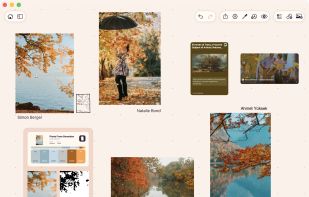
ArtDeck is a native reference-board app for iPhone, iPad, and Mac. Collect images, video, links, notes, GIFs, and PDFs on visual boards, then study value, color, composition, measurement, and motion without leaving the canvas.
Build a moodboard, gather references for a project, or study an artwork up close. Everything stays together instead of scattered across screenshots, folders, and tabs.
COLLECT FROM ANYWHERE
• Take photos and video, scan documents, or import from Photos and Files
• Save web links as preview cards, or import images, video, and PDFs from a link
• Drag and drop, paste, or use the Share menu from other apps
• Open common image formats plus WebP, AVIF, JXL, HDR, EXR, and SVG, along with video, GIFs, and PDFs up to 300 pages
STUDY WHAT YOU COLLECT
Use the ToolBox's five lenses on any image or video frame without changing the original:
• Values: grayscale, value ladder, and Notan for reading light and shadow
• Color: extract a palette or inspect temperature and saturation
• Composition: overlay grids, test framing, and check symmetry
• Read: simplify large shapes, inspect detail density, and follow edge hierarchy
• Measure: use plumb lines, snapping angle guides, and length comparisons
The Analysis panel shows value range, histogram, hue, saturation, and color distribution. Export a study or keep a copy on the board. Step through GIFs and video frame by frame with onion skinning and a filmstrip.
ANNOTATE AND ARRANGE
Mark up images or draw directly with pens, highlighters, and shapes. Arrange everything on an infinite canvas: drag, scale, rotate, group, nest, align, distribute, lock, undo, and redo.
YOUR BOARDS, EVERYWHERE
Keep the same boards on iPhone, iPad, and Mac through iCloud. ArtDeck works fully offline and catches up when you reconnect. Choose which boards sync, use Split View or Stage Manager on iPad, and keep the ArtDeck window above other apps on Mac.
ORGANIZE IT YOUR WAY
Browse every board in carousel or grid view. Add labels, combine filters, and favorite, archive, rename, or duplicate boards.
MAKE IT YOURS
Choose dark, light, or high-contrast themes. Set one theme for the app or customize individual boards with the built-in theme editor, including contrast checks for accessibility.
EXPORT AND HAND OFF
Export a whole board or a selection as PNG, JPEG, HEIC, or PDF, up to 8K. Save a complete board as an .artdeck file for backup or handoff.
One purchase makes ArtDeck yours across your devices. No subscription, no in-app purchases, and no account.
Keep what catches your eye.





 EU
EU


 Alexandre Alves


No comments or reviews, maybe you want to be first?