Comprehensive & Innovative Advanced Search Engine for Android Apps and Games
Find the best apps for any purpose – Find apps with specific features – Discover games that you'll like the most
Comprehensive
? 2,500,000+ apps and games are indexed (2,000,000+ available in the US)
? Local prices and age ratings for 200+ countries / regions
? 8 search operators, 10+ filters, 6 sort options
? 10+ facts about each app directly in the result list
Advanced keyword search
Powerful, reliable, and easy
App Finder returns all and only results that "completely" match the query. That is, all words / phrases from the query are required to occur (if OR is not used). Different word forms are allowed.
As is shown with many detailed examples on our website, this consistently leads to significantly more relevant results than "incomplete matching", which is used in many other search engines.
In addition to usual search operators (quotes, OR, minus, parentheses), there are some special ones:
? + to require words or phrases in title or summary, which can often improve the specificity of queries significantly
? The special OR operator / that has another priority than OR and can be used inside quotes
? # and @ to search for title and developer name by prefix
The integrated help explains all this in detail.
The keywords are highlighted in the results.
AI-based natural-language search is planned as an alternative to keyword search.
All the filters you may need
With one tap, you can filter for apps without ads, for free or paid apps, and for apps with or without in-app purchases.
There are special sliders to filter for
? user rating,
? number of ratings and downloads,
? update date and release date,
? price range and in-app price range,
? required Android version and target-API,
? age rating.
There is a category filter with multi-select.
To discover less-known apps, you may also filter for app with few ratings or downloads.
Systematic sort options
In addition to relevance, you can sort by
? User rating
? Number of ratings up / down
? Release date up / down
Result count
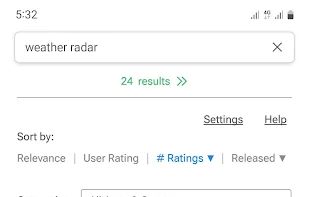
App Finder immediately shows the exact result count when a query is entered or filters are applied, so that you can adjust the search if there are more or less results than you want to inspect.
All essential data directly in the result list
See the screenshots.
? The user rating is shown with up to two decimals, country-average, world-average, or both
? The colorful stars indicate the rating distribution
? It is always indicated if an app contains ads, and the price range of in-app products is shown
Scalable screenshots & short descriptions in the result list
The screenshots can be scrolled and scaled using pinch-to-zoom.
Feature graphics from the developers are included.







 Emin added App Finder as alternative to Aurora Store
 Emin added App Finder as alternative to Google Play Store
 Skyica LLC
No comments or reviews, maybe you want to be first?