


Aurora Store
361 likes
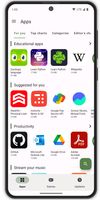
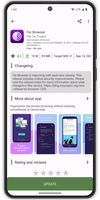
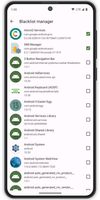
Open source platform for searching, downloading, and updating Android apps from Google Play, supporting login with personal or anonymous accounts, device and locale spoofing, privacy tracker insights, manual older version downloads, and app compatibility checks.


+1

Platforms
- Android
- Android Tablet
- HUAWEI AppGallery
- F-Droid
- OpenAPK

Features
Highlights All activities
Aurora Store News & Activities
Recent News
No news, maybe you know any news worth sharing?
Share a News Tip
Recent activities
- unnoticed6081 liked Aurora Store
- gdaz8lhqgo liked Aurora Store
- hotfixer669 liked Aurora Store
- Ali Faisal replied to a comment / review on Aurora Store
Do not trust them
- Shadow5964 | シャドウ liked Aurora Store
- c17s5qhu updated Aurora Store
- c17s5qhu updated Aurora Store
- c17s5qhu updated Aurora Store
- Danilo liked Aurora Store


Beautiful Open Source Apps for Android (nice & modern UI/UX)
UI = User Interface
UX = User eXperience
Most open source apps offer out-dated or classic material design UI. If the apps works great and the UX is not terrible you might find it okay. But intuitive UI are better, and modern looking ones are pleasant to use, sadly they are not the majority. Here is my list of Beautiful Open Source Apps for your android device !
Apps are listed in alphabetical order !
Also look at : The ultimate F-Droid setup for more open source android apps.
and Beautiful Open Source Apps for iOS for your iOS device
DISCLAIMERS
Nice UI comes to personnal preference. So this list is only based on my taste of what is a good modern looking app.
While open source is great for privacy and security it is not perfect. So keep that in mind before downloading any apps.
I again encourage you to do your own research about them and read their Privacy Policies.
I am not a privacy and security expert. I'm also don't consider myself as a developper so I do not have any technical knowledge and so I didn't look into any source code of any apps in this list !


A clean Android setup with the best apps (mostly open source)
Everytime I setup a phone for a friend or myself I usually remove stock apps using adb or UniversalAndroidDebloaterNextGeneration and replace them with theses apps listed here. I added also a couple of nice to have apps that people might wants on their device.
Almost all of them are free as in free beer and many are open source (around 80%)
I tried to feature more applications and less services but there are several services still in this list, however I find them great and/or accessible (freemium most of the time).
FOSS = Free(as in freedom) and Open Source Software



Into the Cyberverse
The ultimate list of apps/services for better Security, Privacy & Anonymity; Defense against Surveillance.
What sets this list apart is its commitment to authenticity:
No Sponsorship: Choices are made without commercial bias.
No Affiliate Links: Purely user-benefit-focused.
No Brand Deals: Independent and unbiased evaluations.
Strict criteria ensure the tools prioritize user welfare and software quality:
Opensource Preference: Prioritizing transparent and community-driven software.
Cross-Platform Availability: Emphasizing tools usable across multiple systems.
Active Development and Security Updates: Selecting only actively maintained tools with regular security enhancements.
Proven Track Record: Requiring a history of reliability and positive feedback.
Developed by
 Aurora OSS
 Licensing
Open Source (GPL-3.0) and Free product.Rating
Average rating of 4.5Alternatives
76 alternatives listedBadge
Get an embeddable badge for Aurora StoreSupported Languages



Comments and Reviews
Works great! Allows you to download all the apps from the Play Store without need to have Google account. Does what it promises, is stable, super fast and looks beautiful. What else could you want?
Do not trust them
Why not?
Clean, simple, ad free and shows how many trackers are in apps
Updates delivered sooner, and without all Google's 🐂💩
The best Appstore for Android. Privacy aware and very stable
Any alternative to slow and heavy bloatware is more than welcome! Over the years, the Aurora Store has improved a lot, becoming more stable and modern. A huge feature is the possibility to use Shizuku to install apps in the background.
The real use case for this is if you are using an AOSP (Android Open Source Project) OS on your device, like /e/OS, Lineage, etc. Given that they're pretty much de-Googled, your access to Google services are very much limited. So with Aurora, you can access the Google Play Store and download apps with your account or an anonymous account.
A big drawback to this is that the updates of your apps are not so straightforward. This was my experience a few years ago when I tried it. Another drawback is that you will not be able to access previously purchased apps. I was not able to do this.
In terms of positives, you will be able to bypass geographical restrictions and potentially access other apps you would not have seen.
However, it is of my opinion, that if you've already got an official Android OS on your phone, stick with the Play Store. For more app freedom you can go with an F-Droid client.