
AnyKey icon
AnyKey icon

AnyKey

AnyKey is a Chrome extension for using websites from the keyboard. It runs on every site, and it works in Brave and other Chromium browsers too.
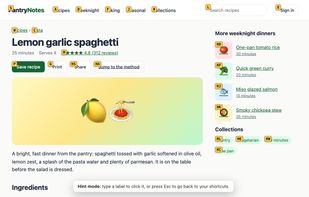
Press F and every link and button in view gets a short label. Type the label to click it.

Cost / License

  • Free
  • Open Source (MIT)

Platforms

  • Google Chrome
  • Brave
0likes
0articles
Save

Features

Properties

  1.  Privacy focused

Features

  1.  No registration required
  2.  Works Offline
  3.  Ad-free
  4.  No Tracking
  5.  Dark Mode
  6.  Keyboard Navigation
  7.  Keyboard Shortcuts
  8.  Mouseless

AnyKey News & Activities

Highlights All activities

Recent activities

AnyKey information

AlternativeTo Categories

OS & Utilities, Office & Productivity, Web Browsers

GitHub repository

  •  0 Stars
  •  0 Forks
  •  0 Open Issues
  •   Updated  
View on GitHub

Popular alternatives

View all
AnyKey was added to AlternativeTo by Jatin-2101 on and this page was last updated .

No comments or reviews, maybe you want to be first?

What is AnyKey?

AnyKey is a Chrome extension for using websites from the keyboard. It runs on every site, and it works in Brave and other Chromium browsers too.

On any page, j and k scroll, d and u move half a page, g g and G go to the top and bottom, H and L go back and forward, and J and K switch tabs. Press F and every link and button in view gets a short label. Type the label to click it, or press g f instead to open a link in a new tab.

You can also give your own shortcut to anything on a page. Click AnyKey's toolbar button, choose "Add shortcut for this site", pick the element and press the keys you want. AnyKey remembers each element several ways, so the shortcut can still find it after the site changes its page.

Presets add keys to GitHub, YouTube and Reddit: g r opens a repository's releases, g l likes a video. Where a site already uses a key, the preset leaves it to the site, and your own shortcuts always win. Press ? on any page to see every shortcut that works there.

AnyKey warns you when two shortcuts clash or the browser keeps a key for itself. Settings sync with your browser and export to a file. It collects no data and makes no network requests, and it's free and open source under the MIT license.

AnyKey Videos