
Airdrop2X icon
Airdrop2X icon

Airdrop2X

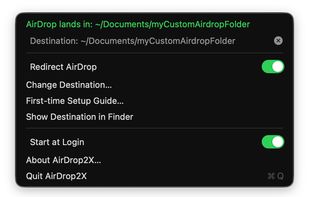
macOS menu bar app that makes AirDrop deliver files straight into a folder of your choosing, on any disk. Switch it on, files land there; switch it off, Downloads is back to normal.
Airdrop2X screenshot 1

Cost / License

Platforms

  • Mac
0likes
0articles
Save

Features

No features, maybe you want to suggest one?

 Tags

Airdrop2X News & Activities

Highlights All activities

Recent activities

Airdrop2X information

GitHub repository

  •  0 Stars
  •  0 Forks
  •  0 Open Issues
  •   Updated  
View on GitHub

Popular alternatives

View all
Airdrop2X was added to AlternativeTo by DrKay on and this page was last updated .

No comments or reviews, maybe you want to be first?

Official Links

What is Airdrop2X?

AirDrop lands where you want it. Any folder, any disk. Free and open source.

macOS drops every AirDrop into Downloads on the internal disk, and there is no setting to change that. AirDrop2X gives you the switch Apple left out: choose a folder — on an external SSD, another volume, wherever — and while the switch is on, files you receive land there directly. Switch it off and Downloads is back to normal.

The Downloads detour Backing up 4K video from an iPhone by AirDrop goes like this: wait for the file to land in Downloads, copy it to the external disk, delete it from Downloads to make room for the next one, repeat. Every file crosses the internal disk twice for no reason, and if a clip is bigger than the free space left, it does not arrive at all.

AirDrop2X removes the detour. The file is written by macOS straight into the folder you chose. Nothing is copied afterwards, nothing has to be cleaned up, and the internal disk is never involved.
