
Wallsmith icon
Wallsmith icon

Wallsmith

 1 like

Turn any video into a wallpaper for your exact screen: framing, seamless loops, colour looks, AI upscaling to 4K and smooth 60–240 fps. Free for Windows.
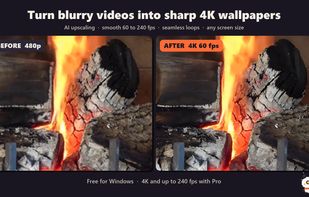
A real 480p clip vs the same clip after Wallsmith (4K, 60 fps)

Cost / License

  • Freemium (Pay once)
  • Proprietary

Application type

Since

  • New

Platforms

  • Windows  Needs a DirectX 12 graphics card (NVIDIA, AMD or Intel)
1like
0articles
Save

Features

Properties

Features

Highlights All activities

Wallsmith News & Activities

Recent activities

Wallsmith information

  • Developed by

    Wallsmith
  • Licensing

    Proprietary and Freemium product.
  • Pricing

    One time purchase (perpetual license) that costs $8 + free version with limited functionality.
  • Alternatives

    12 alternatives listed
  • Badge

    Get an embeddable badge for Wallsmith
  • Supported Languages

    • English
Wallsmith was added to AlternativeTo by Rayan-4521 on and this page was last updated .

No comments or reviews, maybe you want to be first?

Official Links

What is Wallsmith?

Wallsmith turns any video clip into a polished wallpaper for Wallpaper Engine, Lively Wallpaper or any other wallpaper app.

Frame the clip for your exact screen, whether it's 16:9, 16:10, 21:9 or 32:9 ultrawide, or a 9:16 phone. Drag to choose what stays visible, or show the whole video over a soft blurred fill. Trim it, make the end blend into the start so the wallpaper never visibly jumps when it restarts, and give it a look with one-click colour styles or a full colour grade.

Wallsmith can also upscale blurry 480p and 720p clips to sharp 1080p, 1440p or 4K with Real-ESRGAN AI models, and make motion smoother at 60, 120, 144 or up to 240 fps with RIFE frame interpolation. Everything runs on your own PC through DirectML, so it works on NVIDIA, AMD and Intel graphics. Your videos are never uploaded, and no account is needed.

It also lists the video wallpapers already in your Wallpaper Engine library, so you can upgrade one and put it straight back (the original is backed up).

The free version includes framing for any screen, trimming, basic colour, Fast AI upscaling up to 1080p / 1200p and clips up to 1 minute, with small ads in the app. Pro ($7.50, a permanent unlock) adds 1440p/4K/5K, 60-240 fps, AI watermark removal, seamless loops, the Best AI model, blur fill, the full colour grade, any length, HEVC and no ads.

Get it free on the Microsoft Store (search "Wallsmith") or from wallsmith.pages.dev (a self-contained zip, nothing to install). No bundled offers or toolbars.

Wallsmith Videos

Show 1 more video