
Aetherly icon
Aetherly icon

Aetherly

 1 like

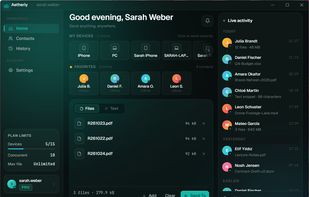
Encrypted peer-to-peer transfers send files, folders, screenshots, and text directly between Windows, iPhone, iPad, and Android devices. Local transfers stay local, while internet connections use WebRTC; contacts, auto-accept, history, and forwarding support regular sharing.
Aetherly screenshot 1

Cost / License

  • Freemium (Subscription)
  • Proprietary

Since

  • New

Platforms

  • Windows
  • Android
  • iPhone
  • iPad
1like
0articles
Save

Features

Properties

Features

Highlights All activities

Aetherly News & Activities

Recent activities

Aetherly information

  • Developed by

    DE flagDuyTec GmbH
  • Licensing

    Proprietary and Freemium product.
  • Pricing

    Subscription ranging between $3 and $10 per month + free version with limited functionality.
  • Alternatives

    44 alternatives listed
  • Badge

    Get an embeddable badge for Aetherly
  • Supported Languages

    • English
    • French
    • German
    • Spanish

AlternativeTo Categories

File Sharing, Security & Privacy
Aetherly was added to AlternativeTo by Y451N on and this page was last updated .

No comments or reviews, maybe you want to be first?

Official Links

What is Aetherly?

Aetherly is a peer-to-peer file, folder, and text transfer app for Windows, iPhone, iPad, and Android. It transfers content directly between devices through encrypted WebRTC connections instead of storing files on a server. Its servers manage sign-in, contacts, permissions, presence, connection setup, and transfer history. Transfers on the same local network stay local; internet transfers require a direct connection and may not work through restrictive corporate firewalls.

Files can be sent to contacts, who must accept them, or between devices on the same account, which receive transfers automatically while online. Windows features include an Explorer context-menu option, clipboard screenshot pasting, a file staging area, and system tray operation. Mobile apps support sharing from other apps through the system share menu; Android also supports QR-code contact addition and background transfers. Text, including links, addresses, and booking codes, can also be sent directly.

Transfer history is shared across devices on the same account and can request a file again from a reachable device that still has it. Transfers can also be forwarded to another desktop on the account. Presence is optional, and real names are shown only after both people add each other as contacts.