


AccessMenuBarApps
9 likes
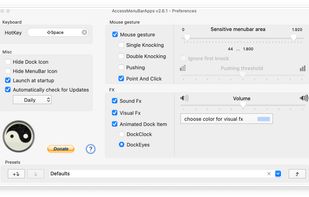
Provides immediate access to all menubar apps on macOS using keyboard shortcuts, mouse gestures, or icons. Works in the background, offers customizable effects, animated dock icons, drag-and-drop gesture support, and system startup launch options.

Cost / License
- Free
- Proprietary
Since
- Since 2013
Alerts
- Discontinued
Platforms
- Mac
Discontinued
The project is no longer developed. Last version, 2.6.1, was released in December 2018.

Features
Highlights All activities
AccessMenuBarApps News & Activities
Recent News
No news, maybe you know any news worth sharing?
Share a News Tip
Recent activities
- Danilo Venom updated AccessMenuBarApps
 Charles Snow added AccessMenuBarApps as alternative to Tuck Menu Bar
 wouf336 added AccessMenuBarApps as alternative to Thaw


Developed by
UnknownLicensing
Proprietary and Free product.Alternatives
10 alternatives listedBadge
Get an embeddable badge for AccessMenuBarAppsSupported Languages


No comments or reviews, maybe you want to be first?