Fast, offline 2FA codes in your browser — TOTP two-factor authentication. Quick import from Google Authenticator.
2FA Authenticator: your two-factor codes, in the tab you are already in
Stop reaching for your phone every time you sign in. Unlock it, find the app, scroll to the right account, read six digits, type them before they expire — that is fifteen seconds, several times a day, for something your browser can do in one click. This extension generates the same codes, from the same standard — the ones you have in Google Authenticator today — right where you are logging in. Free, open source, and no account to sign up for.
⚡ YOUR 2FA CODES WITHOUT PICKING UP YOUR PHONE
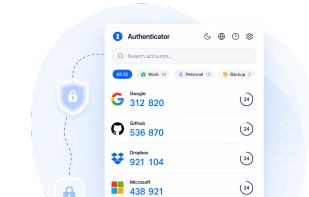
- Click the toolbar icon and every 2FA code is there
- One more click copies the one-time password — paste it and you are in
- The account for the site you are on is suggested first, so you are not hunting through a list
- Search as you type, even with a hundred 2FA accounts
- A ring on each verification code shows how long it has left, so you never paste one that is about to expire
- Your 2FA codes work offline — on a plane, on the underground, on a laptop with no signal
🔐 OPTIONAL PASSWORD PROTECTION FOR YOUR 2FA CODES
🔒 Off by default — turn it on in Settings whenever you want
🔒 Your codes are then encrypted on your device with AES-256-GCM, behind 600,000 PBKDF2 iterations
🔒 Turning it on removes every readable copy of your 2FA data: local storage, sync, and all seven backups
🔒 A recovery code means a forgotten password never costs you your accounts
🔒 Choose when to be asked: every time, after a few idle minutes, or once per browser session
🛡️ WHY THIS 2FA EXTENSION IS SAFE TO TRUST
✅ Open source — the code that generates your codes is public and readable
✅ Reproducible build — every release publishes a SHA-256 for every file, so you can rebuild it and check
✅ Manifest V3, with two Chrome permissions: storage and activeTab — and no host permissions
✅ No content scripts at all, so nothing of this extension ever runs on a page you visit
✅ No analytics, no tracking, no sign-up, no ads
✅ Your secrets are generated and kept on your machine — there is no account to create and no server to trust
✅ Free, with no paid tier, no trial and nothing to upgrade to
✅ A published security policy and a real address to report to







 Kobaltstack added 2FA Authenticator by authenticator.sh as alternative to Bitwarden, Aegis Authenticator, Proton Authenticator, Ente Auth and 47 more


No comments or reviews, maybe you want to be first?