çetele — Notepad Calculator
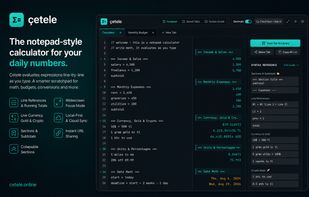
çetele is a Parsify/Soulver-style live notepad calculator built with Vue 3 and Vite. It combines natural text writing with real-time mathematical evaluation, live currency conversions, unit math, date arithmetic, direct line references, and offline multi-tab document persistence.
? Features
? Live Evaluation: Math expressions evaluate instantly on the right column as you type.
💱 Live Currency Math & Conversions:
Mix currencies seamlessly: 10$ + 500 tl (converts secondary currencies automatically)
Direct conversions: 5$ to tl, 100 EUR to USD
Compound post-arithmetic: m + plus to tl + 16000
Live rates fetched from Open ER API with offline localStorage caching.
🔢 Direct Line References:
Reference any line using #1, #2, L1, L2, line1, line2
Relative line reference: prev (immediately preceding line)
Running total: total (sum of all numeric lines above)
🔢 Comma Separator Support: Full support for comma-separated numbers in input (1,000, 1,250.50, 10,000 + 5,000).
💡 Variable Autocomplete: Typing 3 characters or more (sub..., tax..., inc...) shows an inline autocomplete dropdown for declared variables and their values.
📋 Copy All with Results (= result): Click Copy All (=) or press Ctrl+Shift+C to copy your entire document formatted as <input> = <result>.
🎛? Decimals Switch: Toggle decimal places ON/OFF (Decimals vs Integers).
🗂? Offline Multi-Tab Persistence: All tabs auto-save locally to IndexedDB & localStorage. Zero logins or cloud accounts needed.
??/🌙 Dark & Light Themes: Cyberpunk Dark (default) and Clean Light Mode.
?? Keyboard Shortcuts:
Ctrl+N / Cmd+N: New Tab
Ctrl+D / Cmd+D: Toggle Decimals
Ctrl+Shift+C / Cmd+Shift+C: Copy All with Results
Ctrl+, / Cmd+,: Open Settings Modal







 nurulmac11


No comments or reviews, maybe you want to be first?