


Parsify® for Desktop
8 likes
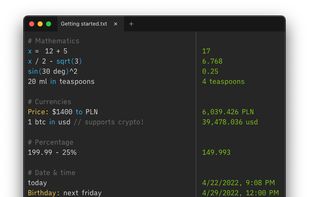
Next generation notepad-based calculator, built with extendibility and privacy in mind. Works on Windows, macOS and Linux.


Features
Highlights All activities
Parsify® for Desktop News & Activities
Recent News
No news, maybe you know any news worth sharing?
Share a News Tip
Recent activities
 Jason-Calder added Parsify® for Desktop as alternative to CalcuPage
 QuanH added Parsify® for Desktop as alternative to Soos
 Qulierm added Parsify® for Desktop as alternative to Numlex
- Alec Kinnear replied to a comment / review on Parsify® for Desktop
 nurulmac11 added Parsify® for Desktop as alternative to çetele
 Paul added Parsify® for Desktop as alternative to Numby
 dinesh-58 added Parsify® for Desktop as alternative to numr


Developed by
Parsify TechnologiesLicensing
Proprietary and Freemium product.Pricing
One time purchase (perpetual license) that costs $30 + free version with limited functionality.Rating
Average rating of 3.3Alternatives
29 alternatives listedBadge
Get an embeddable badge for Parsify® for DesktopSupported Languages



Comments and Reviews
Requires internet to calculate... serious what kind of useless installed desktop calculator that takes up almost 100MB can't be used offline!?
Pay $30 for a massive calculator and it can't run offline... Fix this issue and let me know and I'll be happy to use the program and review it again.
Isn't that just for currency conversions and such?
Not when I used it, couldn't even do basic math without internet.
I've tested today (August 2026). All basic calculations and conversions work offline (teaspoons to cups, km to miles tested). Currency conversion works in the free version but cannot do euros (unless you have access to the euro symbol, but on Fedora Linux Parsify does not accept the Euro symbol, one would have to copy and paste from another app).
That 100 MB download does have me concerned though.
What is cool about Parsify (Soulver is really the best of the lot) is that it's cross-platform including Linux for all the macOS and Windows refugees moving to Linux.
Of all the suggested alternatives to Numi on macOS, only Parsify Desktop comes close. If you want a true Numi replacement on Windows, get this. Ignore all others.