


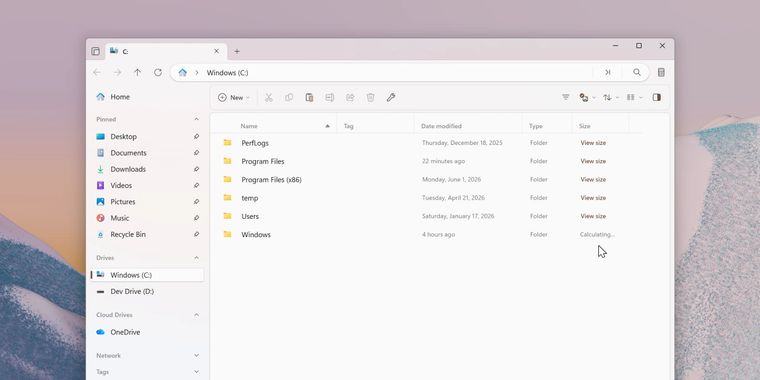

Files 4.1.3 adds on-demand folder sizes, selection saving across layouts, and tag clearing
Files 4.1.3 arrives as the latest update to the modern open-source file explorer for Windows. This release introduces an on-demand approach for folder size calculation: when the “Calculate folder sizes” option is off, a “View size” button appears in the size column for each folder. Users can click this button to calculate a folder's size only when needed, reducing unnecessary background processing.
Following this, Files preserves your current file or folder selection when switching between layouts, making it easier to maintain workflow continuity. Users also gain a streamlined file management experience with the new option to clear all tags from one or more files in a single step. Regarding visual consistency, the OneDrive icon in Files updates automatically to mirror whatever version is found in the installed OneDrive executable.
In addition to these enhancements, Files 4.1.3 delivers seven bug fixes focused on stability and usability. Looking ahead, the Files team is developing a new tree view sidebar that will display folders in an expandable hierarchy. Early testing of this navigation feature is planned soon for preview channel users.





- File Manager
- Free
- Open Source
Related news
External links
- Announcing Files v4.1.3Files • Official source
Comments
Files is a nice change from Windows File Explorer, and looks cool. But I've not been happy with the performance lately. Not as snappy as it used to be. This is a nice edition, but not really something to tempt me back.
Folder sizes is a nice option