


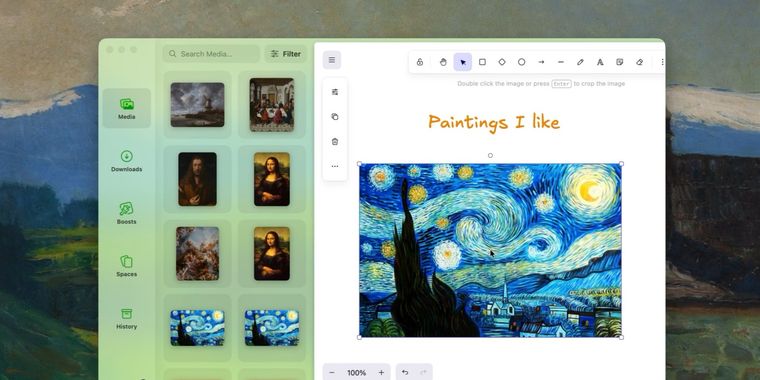

Zen browser 1.23b introduces library system to organize history, media, downloads & spaces
The Zen web browser has released version 1.23b, a significant update built on Firefox 157 that brings both aesthetic refinements and substantial performance improvements. The standout addition is a new library system, designed to serve as a centralized hub for organizing browsing history, media files, downloads, and workspace configurations. Alongside the new interface elements, the development team has addressed long-standing performance bottlenecks related to tab management, promising noticeably faster startup times and smoother window operations even when users have dozens of tabs open simultaneously.
Several smaller but meaningful tweaks enhance day-to-day usability. Video playback has received attention, with improved audio-video sync stability when adjusting playback speeds, a welcome fix for power users who frequently speed up YouTube tutorials or lectures. WebRTC video calls can now leverage hardware AV1 decoding on compatible devices, reducing CPU load during video conferences. The update also introduces subtle visual polish, including blur effects on the sidebar and command bar, larger macOS sidebar buttons, and gesture-based workspace navigation that creates new spaces with a right swipe. A notable flexibility improvement allows users to resize the sidebar even when hidden, though resizing beyond a certain threshold will trigger automatic collapse.
For advanced users, the release includes configurable options accessible through the about:config menu, such as the ability to disable swipe gestures via the zen.workspaces.swipe-actions setting. As Zen continues iterating on its Firefox foundation, version 1.23b demonstrates a focus on refinement over radical change, balancing workflow enhancements with the browser's distinctive design philosophy.





- Web Browser
- Free
- Open Source
Related news
External links
- Zen v1.23b release notesZen • Official source
- Zen Browser introduces 'Library' to unify history, media, and spaces in version 1.23bPiunikaWeb
- Zen Browser 1.23b Adds Library Feature, Ships on Firefox 157 with 70+ Security PatchesLinux Compatible
No comments so far, maybe you want to be first?