
• Discover icon
  • Black Box icon
  • Vibe Typer icon
  • Sublime Text icon
  • Strata File Manager icon

Best Linux setup

CaveMan-Harris5 appsUpdated
Copy a direct link to this comment to your clipboard

As a Windows user since its inception, starting with Windows 3.0, it's taken me many many many years to switch over to Linux. What held me back was proper software for me to be able to do in Linux what I did in Windows. this list is a list of the best Linux programs to do what I used to do in Windows most effectively quickly and without any schlepp

  1. Discover icon
     Like

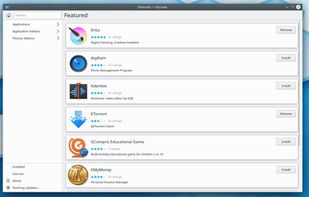
    Utility for KDE's Plasma desktop environment for browsing, installing, and removing applications, implemented as an app store like application.

    Cost / License

    • Free
    • Open Source

    Application type

    Platforms

    • Linux
    • KDE Plasma
    • Snapcraft
    Discover in Plasma 5
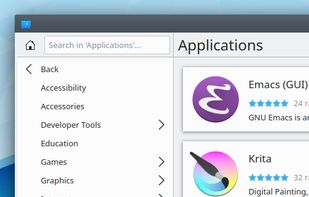
    Discover, category
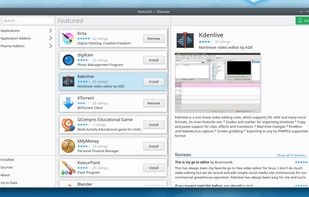
    Discover, single package
    CaveMan-Harris’s note

    Plasma Discover is always my go-to tool for finding alternative software because the software manager on Ubuntu is really not what it used to be. I'm always wondering why they try and impress you with the graphics while at the same time lack the best decent software you can get.

  2. Black Box icon
     Like

    Black Box is a native terminal emulator that offers superb theming options.

    Cost / License

    • Free
    • Open Source

    Application type

    Platforms

    • Linux
    • Flathub
    • Flatpak
    Black Box screenshot 1
    Black Box screenshot 1
    CaveMan-Harris’s note

    All the Linux terminals, this one, and this might sound silly, but this is the only one that's got a decent tab functionality at the top. The other terminals just seem so half programmed. It's like it was slapped together, but it was never glued. Small things that is important to me as a user is the fact that I can rename tabs and with certain high security commands the whole actual terminal tab list at the top changes color so you can see that there is something critical happening

  3. Vibe Typer is voice typing for Linux, Windows, Mac and iPhone. Press a hotkey, speak, and clean, punctuated text is typed at your cursor in any app, terminals and code editors included. No window to copy from and no per-app setup.

    Cost / License

    • Freemium
    • Proprietary

    Application type

    Platforms

    • Mac
    • Windows
    • Linux
    • iPhone
    Magic Formatter: what you said against what was typed
    A dictionary that learns from your corrections
    Words dictated and time saved
    +5
    Per-app paste settings
    CaveMan-Harris’s note

    After using Whisper Flow on Windows for almost a year and switching to Linux permanently, I was lost without my dictation software. Not only is Vibe Typer better, but the fact that it has a proper Linux Version It's a huge plus. On top of that, Vibe Typer, the company doesn't use your data to train its models. It has its own training tools.

  4. Sophisticated text editor for code with sleek interface, multi-select tabs, side-by-side definitions, and swift variable renaming using multiple selections.

    Cost / License

    • Freemium
    • Proprietary

    Application type

    Platforms

    • Mac
    • Windows
    • Linux
    • Snapcraft
    • Flathub
    • Flatpak
    Sublime Text screenshot 1
    Sublime Text screenshot 1
    Sublime Text screenshot 2
    +2
    Sublime Text screenshot 3
    CaveMan-Harris’s note

    Sublime Text is probably the closest I'll come to using Notepad++ on Linux. There are one or two more that also comes close and you'll probably find them in my list as well.

  5. Strata combines spatial Miller-column navigation with familiar Icons and List views, instant fuzzy filename search, rich previews, and native Linux desktop integration. It is designed for Omarchy and works on compatible GTK4 Linux environments.

    Cost / License

    • Free
    • Open Source

    Application type

    Platforms

    • Linux
    Strata File Manager screenshot 1
    Strata File Manager screenshot 1
    Strata File Manager screenshot 2
    +4
    Strata File Manager screenshot 3
    CaveMan-Harris’s note

    This file manager for Linux is the closest I can get to have the functionality of a Windows file manager and an Apple Mac file manager. there's one small quirk but otherwise it's a hundred times better than those boring file managers that you get in Linux.

No comments so far, maybe you want to be first?