• NeuronWriter icon
  • Perplexity icon
  • Adobe Firefly icon
  • Microsoft Designer icon
  • VEED.IO icon
  • +4

Actually useful AI tools

Ben KumarBen Kumar9 appsUpdated
Copy a direct link to this comment to your clipboard

These are a list of actually useful AI tools that I use on a day-to-day basis. Almost all of them are free, and they offer even more features with paid plans. These apps are mainly for content creation, research, basic graphic design, image enhancement, and video editing. There are additional apps that are not listed here, such as tethered.ai.

There will be a part 2 to this list :)

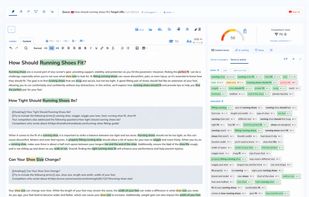
  1. Advanced content editor with semantic models (NLP), Google SERP analysis, and competition data.

    Cost / License

    • Paid
    • Proprietary

    Application type

    Platforms

    • Software as a Service (SaaS)
    NeuronWriter screenshot 1
    NeuronWriter screenshot 1
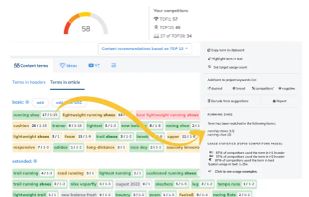
    NeuronWriter screenshot 2
    +4
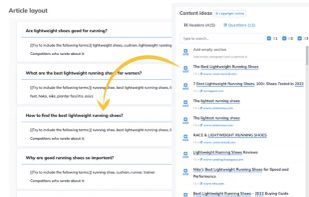
    NeuronWriter screenshot 3
    Ben KumarBen Kumar’s note

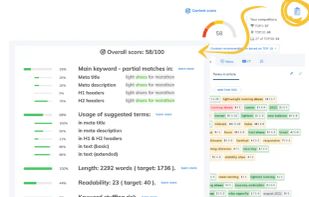
    Content creation dashboards of sorts for SEO people and web content writers. This tool has so many useful features that its difficult to fit them all here. It goes through competitors and gives you a comprehensive backbone to start writing. And it is powered by AI!

    The free version is one of the best, you can use all its features without restriction. Try it out!

  2. AI tool transforming search experiences by providing accurate answers through a conversational interface, considering context and user preferences.

    Cost / License

    • Freemium
    • Proprietary

    Application type

    Platforms

    • Mac
    • Windows
    • Online
    • Android
    • iPhone
    • Android Tablet
    • iPad
    • Google Chrome
    Perplexity screenshot 1
    Perplexity screenshot 1
    Perplexity screenshot 2
    +10
    Perplexity screenshot 3
    Ben KumarBen Kumar’s note

    This is the perfect content research and writing companion. It is powerful and fast in terms of the amount of work it can handle. Not only does it provide you with information, but it also generates citations. The standout feature of this app is the co-pilot feature, which is a powerful research tool that allows you to refine your searches and add more context.

    They offer a free version that allows unlimited usage of general AI, similar to what ChatGPT 3 does. Additionally, you get 5 co-pilot uses for every 4 hours. I found that to be sufficient for starters. Eventually, I upgraded to the $20 monthly plan, which provides unlimited uses. It's much better than ChatGPT4.

    The app is available on Android, iOS, and as a web application

  3. Experiment, imagine, and make an infinite range of creations with Firefly, a family of creative generative AI models coming to Adobe products.

    Cost / License

    • Paid
    • Proprietary

    Application type

    Platforms

    • Online
    • Adobe Illustrator
    • Adobe After Effects
    • Adobe Photoshop
    • Adobe Lightroom
    • Adobe Creative Cloud
    • Adobe Premiere Pro
    • iPhone
    • Android
    Adobe Firefly screenshot 1
    Adobe Firefly screenshot 1
    Adobe Firefly screenshot 2
    +5
    Adobe Firefly screenshot 3
    Ben KumarBen Kumar’s note

    Free, no-fuss, top-of-the-shelf text-to-image generator. It offers numerous customizable options to help you achieve the desired output. Another useful feature is its generative AI for images! It's simply the best free tool currently available. Surprisingly, it works exceptionally well for quickly enhancing photos.

  4. Graphic design app in Microsoft 365 that helps you create social media posts, invitations, digital postcards, graphics, and more, all in a flash.

    Cost / License

    • Freemium
    • Proprietary

    Application type

    Platforms

    • Online
    • Android
    • iPhone
    • Windows
    Microsoft Designer screenshot 1
    Ben KumarBen Kumar’s note

    This is another alternative to Canva that I use to create quick social media posts with prompts. It offers basic features, but it's extremely helpful during time crunches. I've used it for my company on multiple occasions.

  5. VEED.IO icon
     Like

    Online video editor with AI-powered subtitle tools, background noise removal, text-to-video conversion, screen and webcam recording, and drag-and-drop editing.

    Cost / License

    • Freemium
    • Proprietary

    Application type

    Platforms

    • Online
    • Software as a Service (SaaS)
    Video Editor
    Template Page
    Home Page
    Ben KumarBen Kumar’s note

    I primarily use this app to generate quick video captions. It accurately generates captions about 95% of the time. The web app is designed for video editing, particularly for efficient and speedy completion of tasks. You don't need technical skills to use it.

  6. PDFgear icon
     Like

    Read, edit, convert, merge, and sign PDF files across devices, for completely free and without signing up.

    Cost / License

    • Free
    • Proprietary

    Application type

    Platforms

    • Mac
    • Windows
    • Online
    • Android
    • iPhone
    • Android Tablet
    • iPad
    PDFgear screenshot 1
    Edit PDF
    Annotate PDF
    +2
    Convert PDF
    Ben KumarBen Kumar’s note

    Probably the most comprehensive free PDF suite available. Yes, it's completely free! Many people have raised questions about its free nature, and the developer's response has always been to reach a wider user base. It comes with its own built-in AI that can interact with your PDF files. It's the only PDF tool you'll ever need on Windows.

  7. SnapEdit is a one of the best photo editors using AI with a mission to make photo editing easy, smooth and fun. Here are our best features: Remove objects, Enhance photos, Remove Background images, Anime Ai to turn your picture into anime arts!

    Cost / License

    • Freemium
    • Proprietary

    Application type

    Platforms

    • Mac
    • Windows
    • Online
    • Android
    • iPhone
    • iPad
    SnapEdit helps remove objects from images
    SnapEdit - AI Photo Editor screenshot 1
    SnapEdit - AI Photo Editor screenshot 2
    +7
    Auto detect objects
    Ben KumarBen Kumar’s note

    I use this app exclusively to enhance images. It does have other features like background remover and stuff. I have just found this to be the best for enhancing images.

  8. Listen to the best highlights from the podcasts you love and dive into the full episode.

    Cost / License

    • Freemium
    • Proprietary

    Application type

    Platforms

    • Android
    • iPhone
    • iPad
    snipd Podcasts screenshot 1
    snipd Podcasts screenshot 1
    snipd Podcasts screenshot 2
    Ben KumarBen Kumar’s note

    This is my favorite podcast app. I use it everyday, especially listening to business, tech related podcasts. It can create captions, highlights, take notes, and summarize with AI.

  9. ChatGPT icon
     Like

    ChatGPT is a generative artificial intelligence chatbot created by OpenAI and launched in November 2022. It is built on large language models (LLMs), enabling it to understand and generate human-like text, images, and even speech.

    Cost / License

    • Freemium
    • Proprietary

    Application type

    Platforms

    • Mac
    • Windows
    • Linux
    • Online
    • Android
    • iPhone
    • Android Tablet
    • iPad
    • Google Chrome
    ChatGPT screenshot 1
    ChatGPT screenshot 1
    ChatGPT screenshot 2
    +1
    ChatGPT screenshot 3
    Ben KumarBen Kumar’s note

    You already know.

Comments

Ola Johansson
1
CTO / Co-Founder at AlternativeTo

What a great list! Will try a few of these!