Here are the web browsers you should consider to set as default on iOS 14

https://alternativeto.net/software/ios/about/ 14 finally offers the possibility for users to change their default web browser. It's rather limited for the moment, with only 8 web browsers available, but this list should grow rapidly, since only a few conditions are needed to take advantage of the API.

In order to change your default browser, head into the Settings app, then scroll down to the browser you want to be your default. Click it and you’ll see a “Default Browser App” option if it’s default eligible.

Paul
Paul List by Paul , last updated 
Copy a direct link to this comment to your clipboard
  1. The famous web browser from Mozilla is one of the obvious choices if you want a reliable web browser that's free and open source. Many people use it on desktop, and it's nice to be able to use it on iOS too, since you can sync everything (bookmarks, settings, addons…) between your devices. It seems Firefox Focus icon Firefox Focus can't be set as default for the moment, and I don't know if it's a choice from Mozilla, or if an update will allow this in the future.

    Cost / License

    • Free
    • Open Source

    Platforms

    • Mac
    • Windows
    • Linux
    • Android
    • iPhone
    • Android Tablet
    • BSD
    • iPad
    • AppImageHub
    • Snapcraft
    • Flathub
    • Samsung Galaxy Store
    • PortableApps.com
    • Haiku
    • Flatpak
    • Homebrew
    • Chocolatey
    • Gecko
    Firefox Desktop (Light Theme)
    Firefox Desktop (Dark Theme)
    Firefox iOS (Light Theme)
    +7
    Firefox iOS (Dark Theme)
  2. Brave icon
     Like

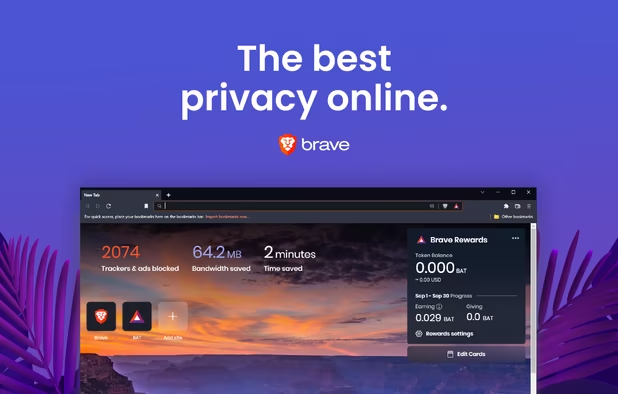
    Brave is a Chromium icon Chromium based open source web browser concerned about protecting your personal data while respecting the principle of website remuneration through advertising. To achieve this, Brave includes a scalable ad blocker that allows you to either completely remove advertising, replace it with a more relevant ad, or allow the original ad. It has been developed since 2016 and designed by Brendan Eich, also co-founder of Mozilla Firefox icon Mozilla Firefox and creator of JavaScript.

    Cost / License

    • Free
    • Open Source

    Application types

    Platforms

    • Mac
    • Windows
    • Linux
    • Android
    • iPhone
    • Android Tablet
    • iPad
    • Snapcraft
    • Flathub
    • Homebrew
    • Chocolatey
    Brave screenshot 1
    Brave screenshot 1
    Brave screenshot 2
    +4
    Brave screenshot 3
  3. The privacy-focused search engine has been available as a separate web browser for iOS and Android for years, and you can now use it instead of Safari icon Safari (that's what I'm doing on my iPhone SE). Like all other iOS web browsers, it's based on Apple's WebKit page rendering engine, but it adds some interesting features like an ad blocker, a privacy grade for each website, a “Fire” button to erase your tabs and history, and much more.

    Cost / License

    • Freemium
    • Open Source

    Application types

    Platforms

    • Mac
    • Windows
    • Android
    • iPhone
    • Android Tablet
    • iPad
    • F-Droid
    DuckDuckGo Privacy Browser screenshot 1
    DuckDuckGo Privacy Browser screenshot 1
    DuckDuckGo Privacy Browser screenshot 2
    +5
    DuckDuckGo Privacy Browser screenshot 3
  4. The mobile version of the well-know Opera icon Opera web browser is also an option on iOS 14. This web browser features a dark theme, a built-in ad blocker, a private mode, and a one-hand action button for when you're on the move. If you're an Opera desktop user, then this is probable the best option for you, and like most browsers, you'll be able to sync and send files, links and notes between your devices thanks to “My Flow”.

    Cost / License

    • Free
    • Proprietary

    Application type

    Platforms

    • Android
    • Android Tablet
    Opera Touch screenshot 1
    Opera Touch screenshot 2
    Opera Touch screenshot 3
  5. Microsoft Edge is the successor of the infamous Internet Explorer icon Internet Explorer, which was the most used web browser in the late 90' and early 2000 (with more than 95% market share between 2002 and 2004!). The browser boasts of having “More privacy. More control. More productivity.” but I haven't tested it myself, so I can't really tell if it's true or not (let me know in the comments).

    Cost / License

    • Free
    • Proprietary

    Platforms

    • Mac
    • Windows
    • Linux
    • Android
    • iPhone
    • Android Tablet
    • iPad
    • Flathub
    Microsoft Edge screenshot 1
    Microsoft Edge screenshot 1
    Microsoft Edge screenshot 2
    +4
    Microsoft Edge screenshot 3
  6. Last but not least, Google Chrome, the most used web browser in the world. As you might know if you've read some of my other lists on AlternativeTo, I'm not a big fan of Google to say the least, and I don't think there's anything that hasn't already been said about this web browser. It's pretty fast, it works great, it's multiplatform and its extensions' ecosystem is huge, but it's owned by Google, and I think your personal data deserve better than that.

    Cost / License

    • Free
    • Proprietary

    Application type

    Platforms

    • Mac
    • Windows
    • Linux
    • Android
    • iPhone
    • Chrome OS
    • Android Tablet
    • iPad
    • PortableApps.com
    Main Window
    Settings
    Incognito Mode
    +8
    Main View (Android)

At the time of writing this article, only two other web browsers (https://alternativeto.net/software/yandex-browser/ and https://alternativeto.net/software/aloha-browser/) can be set as default on iOS 14, but there might be more in the future.

No comments so far, maybe you want to be first?
Gu