Apps tagged with 'screen-writer'

All apps in Apps tagged with 'screen-writer' category. Use the filters below to narrow down your search. 
Copy a direct link to this comment to your clipboard
  1. Ardesia icon
     6 likes

    Ardesia is an usefull software for use your desktop as a Sketchpad. You can write, markup and erase, also, of course, you can use your desktop as normal desktop.

    Cost / License

    • Free
    • Open Source

    Alerts

    • Discontinued

    Platforms

    • Windows
    • Linux
    Ardesia on Ubuntu Lucid
    Ardesia on Windows7
    Ardesia screenshot 2
    +3
    Ardesia screenshot 3
    9 alternatives
  2. Contour icon
     1 like

    Contour is a story development system that streamlines the process of turning your movie ideas from first glimmer to full outline, is now available for OS X, iOS and Windows.

    Cost / License

    • Paid
    • Proprietary

    Platforms

    • Mac
    • Windows
    • iPhone
    • iPad
    Contour screenshot 1
    Contour screenshot 1
    Contour screenshot 2
    +3
    Contour screenshot 3
    5 alternatives
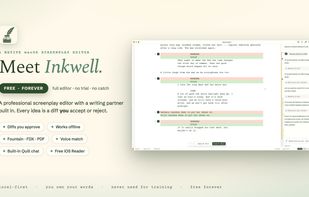
  3. Inkwell is a modern screenwriting app that combines professional formatting with an integrated AI co-writer named Quill. Designed for writers, not robots, Inkwell helps you brainstorm ideas, improve dialogue, and refine your story while keeping your creative voice in full...

    Cost / License

    • Freemium
    • Proprietary

    Platforms

    • Windows
    • Mac
    • Linux
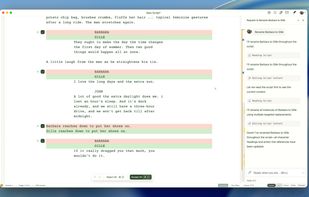
    Quill never auto-applies edits. Suggestions appear as diffs—added text in green, deletions in red. Click accept or reject. Simple. Transparent. You stay in complete control of every single word.
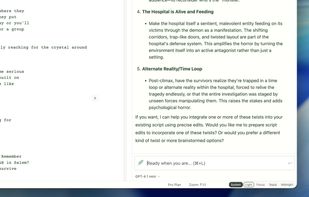
    Chat with Quill AI like you'd brainstorm with a writing partner. Ask for scene ideas, dialogue options, character development, or plot twists. Quill understands your script's context and offers suggestions tailored to your story.
    Write on a plane. Write in a cabin. Write anywhere without worrying about Wi-Fi. Inkwell is a desktop app that saves locally and autosaves your work. When you're back online, Quill is ready—but the editor never stops working.
    +2
    Clean, distraction-free interface. Select from Light, Sepia, Focus, or Midnight themes to match your mood and environment. No learning curve—if you've written a script before, you'll feel at home immediately.