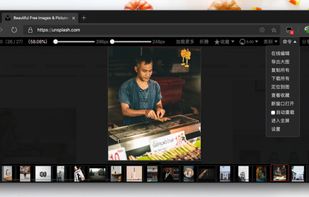
Zoom images across all your favorite websites. Pop up, scale, edit, rotate, batch save images, or automatically load pictures from subsequent pages. Simply hover your mouse over any image and click the icons on the float bar.

Zoom images across all your favorite websites. Pop up, scale, edit, rotate, batch save images, or automatically load pictures from subsequent pages. Simply hover your mouse over any image and click the icons on the float bar.

With Omni you can use Firefox like a pro. Manage tabs, bookmarks, your browser history, perform all sorts of actions and more with a simple command interface.
Menu Icons Plus iconifies your Firefox menus and more! It includes several different icons sets to choose from, along with the ability to import/export icon sets. It also provides options for changing other aspects of the menus' appearance.


Markdown document viewer. Allows to visualize formatted markdown documents in browser.

MozillaCacheView is a small utility that reads the cache folder of Firefox/Mozilla/Netscape Web browsers, and displays the list of all files currently stored in the cache.

PDF Download is the leading tool for handling, creating, and viewing Web-based PDF files, enjoyed by millions of users every day. Our browser add-on removes the pain you experience every time you encounter a PDF file online -- reducing browser crashes, speeding up the display of...


HTML Validator is a Mozilla extension that adds HTML validation inside Firefox and Mozilla. The number of errors of a HTML page is seen on the form of an icon in the status bar when browsing. The details of the errors are seen when looking the HTML source of the page.

The Pdf It! extension is designed for FireFox and runs on any platform: Windows, Mac OS X and Linux. The Pdf It! menu item will be installed at Browser-->Tools menu as well as context menu

Sometimes you might want to share a screenshot of the website you're on, without revealing the personal data that is visible at that time. With Obfuscate, you can make text unreadable without changing the structure of the web page.


A plugin to scroll to top and vice versa of a window. It is really beautiful and is highly customizable.

lawlietfox is a custom Firefox build. The purpose of lawlietfox is providing better performance than official builds.
Anonymous Browsing using Proxy Switcher automatically switching among multiple available proxy servers.


pcxfirefox is a custom Firefox build, its project purpose is improving Firefox's performance and keeping a certain stability. Testing the popular compilers' overall performance.
AllAccounts is an extension that allows Firefox to connect to websites using different user names. Formerly known as Multifox 2 (BETA). It allows having individual cookies sets, chosen per tab.
One-click color inversion, brightness scaling and hue filtering for entire web pages. Adapt web content for reading, saving, printing or beaming.


Cloud Browse is an app that allows you to watch Flash videos and run Flash and Java games from your iPhone, iPod touch, or iPad. To do this, Cloud Browse runs Firefox on a remote server and displays it on your mobile device, so that you get a full desktop experience.


Firefox History Merger is a CLI application written in Go to merge history of Firefox from a list of places.sqlite files and repair missing favicons with ease.


GrandBastard offers 200K checkmate puzzles for chess lovers who want to practice their endgame.


BrowsingHistoryView is a utility that reads the history data of 4 different Web browsers (Internet Explorer, Mozilla Firefox, Google Chrome, and Safari) and displays the browsing history of all these Web browsers in one table.

Free text-to-speech browser extension button. Select text on any web page, and have the computer read it out loud for you by simply clicking the Talkie button.


To increase privacy in public spaces this extension blurs your messages as well as other content and only reveals one when you hover over it with your mouse cursor. Additionally, you can quickly toggle all effects by using a keyboard shortcut or by clicking the toggle button in...


Each time you'll visit a Wikipedia page or article, you'll be automatically redirected to its classic layout version (i.e. before the January 2023 interface changes). It does not require to have a Wikipedia account.

Alternative to the standard Cookie Manager provided by Netscape and Mozilla browsers.